Skip to content
Table of Contents
ProfitMaps AI Review (2026) $43K Premium Bonus Package FREE!
Welcome to my in-depth ProfitMaps AI Review.
Local businesses depend heavily on their visibility when potential customers search for nearby products and services. Whether someone needs a plumber, dentist, electrician, roofing contractor, chiropractor, beauty salon or local restaurant, appearing prominently in Google Search and Google Maps can influence which businesses receive attention.
However, there is an important aspect of local search visibility that many business owners do not fully understand.
A business might appear prominently when its owner searches for its own company name or checks Google Maps from the immediate vicinity of its premises. That does not necessarily mean it will appear in the same position when someone searches for its services from another part of the town.
Local search results can vary depending on the searcher’s location, the search query and other factors. Consequently, a business that looks highly visible from one location may have weaker visibility elsewhere.
This creates an interesting opportunity for local SEO consultants, digital marketers and agencies.
Instead of approaching a business owner with a generic message claiming that their website needs SEO, a marketer can show a visual representation of the business’s local search visibility and explain where potential improvements may be needed.
This is the central idea behind ProfitMaps AI.
ProfitMaps AI is an AI-powered local SEO and business prospecting platform designed to scan local businesses across geographical grid points, identify ranking positions, analyse competitors, generate visual reports and help marketers create a more practical approach to finding potential clients.
The platform aims to bring several activities into one working environment. These include local ranking scans, competitor analysis, AI-generated action plans, branded reports, website creation, lead capture, Google Business Profile content generation and business prospecting.
Its main selling proposition is straightforward:
Show a local business where it is difficult to find on Google Maps, present the opportunity visually and offer services that may help improve its online visibility.
At first glance, this is an appealing concept. Local SEO services can be difficult to explain to business owners who are unfamiliar with search engine optimisation. A visual map showing ranking positions across different locations can make the conversation more understandable.
But does ProfitMaps AI provide enough practical functionality to support this workflow? Are its features useful for beginners? What do the Basic, Gold and Platinum plans actually include? Are scan credits an additional consideration? Does the software automatically bring paying clients, or must users still handle prospecting and sales themselves?
These are important questions to consider before purchasing.
In this comprehensive ProfitMaps AI Review, we will examine the product’s advertised functionality, workflow, features, pricing, upgrade structure, included bonuses, limitations and potential business applications.
We will also discuss the practical work that remains the user’s responsibility, including contacting local businesses, reviewing AI-generated content, implementing SEO recommendations and managing client relationships.
This review is based on the supplied official JV information, sales-page material, product descriptions and demonstration details. We distinguish between advertised capabilities and independently established outcomes. We are not presenting illustrative screenshots, sample businesses or promotional income calculations as independently verified customer results.
If you are considering ProfitMaps AI as a possible addition to your digital marketing business, this review will help you understand what the platform is designed to do and what you should evaluate before making a purchasing decision.
Let’s get started.
Affiliate Disclosure
This article contains affiliate links. If you purchase ProfitMaps AI through an eligible affiliate link on this website, we may earn a commission at no additional cost to you. This helps support RidhTekReviews.Com and allows us to continue publishing detailed reviews of digital products, AI software and online marketing tools.
Our editorial objective is to provide useful, balanced and transparent information so readers can make informed purchasing decisions. Affiliate relationships do not change our responsibility to discuss product limitations, pricing considerations, potential additional costs and practical requirements.
Please remember that purchasing any digital marketing software does not guarantee business growth, customers, search rankings or income. Your results will depend on your skills, implementation, market conditions, available resources and the services you provide.
ProfitMaps AI Review: ProfitMaps AI Product Snapshot
Introducing ProfitMaps AI
One Scan. One Report. One Opportunity! Discover local Google Maps visibility gaps, generate professional reports and identify potential local SEO business opportunities.
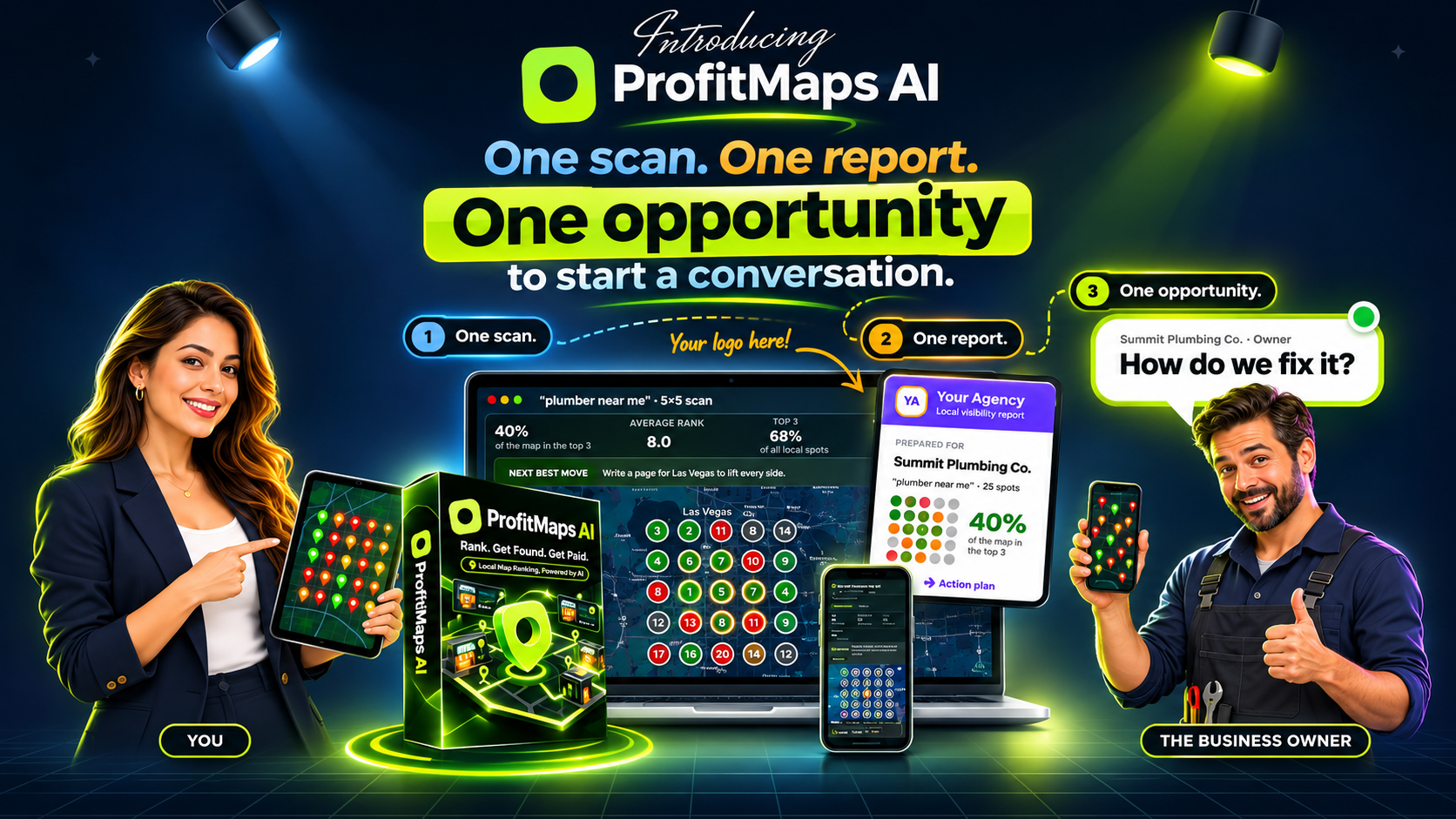
Turn Local Ranking Insights Into Meaningful Business Conversations!
What Does ProfitMaps AI Offer?
The supplied sales page advertises a 30-day money-back guarantee. Review the official checkout terms and refund policy before purchasing.
Product Information
Vendor: Karthik Ramani & Chad Nicely
Launch Date: 21 October 2026
Launch Time: 11:00 AM EDT
Category: AI Tools, Local SEO & Digital Marketing
Ready to Explore ProfitMaps AI?
Check the available plans, explore the features and choose the package that matches your requirements.
GET PROFITMAPS AI – STARTING AT $37Check the official checkout page for current availability and pricing.
ProfitMaps AI Review: Who Created ProfitMaps AI?
Behind ProfitMaps AI

ProfitMaps AI is presented by Karthik Ramani and Chad Nicely. Their platform focuses on AI-powered local SEO analysis, Google Maps visibility scanning and business prospecting.
Karthik Ramani
Co-creator of ProfitMaps AI, a platform designed to help marketers explore local search visibility and business opportunities.
Chad Nicely
Co-creator of ProfitMaps AI, focused on bringing local SEO scanning and reporting tools into an integrated marketing workflow.
ProfitMaps AI Review: Webinar, Sales & Full Demo Videos
ProfitMaps AI Webinar
Watch the ProfitMaps AI webinar to learn about the platform, its core concept, local SEO opportunities and how its tools are designed to help marketers and agencies analyse Google Maps visibility and discover potential business prospects.
ProfitMaps AI Sales Video
Explore the official ProfitMaps AI presentation to understand the problems the software aims to address, its advertised capabilities and how the platform may fit into a local SEO service or digital marketing workflow.
ProfitMaps AI Full Demo
Take a closer look at the ProfitMaps AI software through its full demonstration. See the platform interface and explore how its advertised features are presented, including local ranking analysis and reporting workflows.
ProfitMaps AI Review: What Is ProfitMaps AI?
ProfitMaps AI is an AI-powered local business visibility analysis and lead-generation software platform.
Its primary purpose is to help users identify local businesses that may not appear prominently across different Google Maps search locations and use that information to start conversations about potential SEO services.
The software is built around geographical grid-based ranking analysis.
Rather than checking only one search location, the platform checks multiple points around a business and displays the resulting ranking information in a visual map.
This matters because local search visibility is not necessarily uniform across an entire service area.
For example, imagine a plumbing company operating in a particular city.
When someone searches for a plumber near the company’s office, the business might appear among the first few results. However, when another customer searches from a neighbourhood several kilometres away, the same company may appear much lower or may not appear within the displayed results.
The owner may not recognise this problem because their own searches are not necessarily representative of every potential customer’s search experience.
ProfitMaps AI attempts to make these differences easier to understand.
The software scans multiple geographical points, displays ranking positions and categorises visibility into different groups.
According to the supplied product material, the visual map can show:
- Businesses appearing in the top three results.
- Businesses ranking between positions four and ten.
- Businesses appearing between positions eleven and twenty.
- Locations where the business is not found in the checked results.
The resulting map can be used as a visual reporting tool.
Instead of sending a business owner a lengthy technical SEO spreadsheet, a marketer can share a map showing where the business appears and where it is less visible.
The platform also includes additional tools designed to support the next stages of the workflow.
These include:
- Competitor analysis.
- AI-generated action plans.
- Branded PDF reports.
- Shareable report links.
- AI website planning and generation.
- Lead capture.
- Google Business Profile post generation.
- Local article generation.
- Keyword discovery.
- Ranking history.
- Business Finder.
- Agency workspaces.
- White-label reporting on eligible plans.
- Recurring ranking scans.
- Spreadsheet exports.
The idea is to connect local business discovery, visibility analysis, client communication and service delivery in a single platform.
However, it is important to understand that ProfitMaps AI is not simply an automatic client-acquisition machine.
The software can help users prepare reports, identify opportunities and create supporting materials. Users still need to identify appropriate businesses, communicate professionally, explain the findings, agree on services, determine pricing and perform or supervise the actual work.
That distinction is central to understanding the product.
The main concept behind ProfitMaps AI
The platform is built around five practical stages:
1. Find a business
Choose a local business from Google Maps or use the Business Finder functionality available on eligible plans.
2. Scan its visibility
Run a geographical ranking scan using a selected keyword and scan grid.
3. Identify potential opportunities
Review the ranking positions, competitors and areas where the business is less visible.
4. Create a report and supporting materials
Generate a branded report, an AI action plan and, where appropriate, a sample website.
5. Contact the business owner
Share the information and offer relevant services if the business owner is interested.
This approach can make the initial sales conversation more specific because it starts with an observable business issue rather than a generic marketing pitch.
For readers interested in broader AI-assisted business workflows, we have also covered several other digital marketing products on RidhTekReviews.Com.
You can explore our ViralForge Review, which discusses an AI-assisted content creation platform, and our BuyerEngine AI Review for another perspective on AI-powered marketing and customer acquisition workflows.
These articles cover different marketing applications, but the common consideration remains the same: understand what the software actually automates and what still requires human execution.
ProfitMaps AI Review: How Does ProfitMaps AI Work?
The most important part of understanding ProfitMaps AI is its geographical scanning process.
Many people are familiar with checking a business’s Google Maps position by entering a keyword and looking at the results.
However, a single search from one location provides only a limited view of local visibility.
ProfitMaps AI is designed to examine multiple geographical positions around a selected business.
Step 1: Select a local business
The first stage is selecting a business that you want to analyse.
The product material identifies several potential industries, including:
- Plumbers.
- Electricians.
- Locksmiths.
- Dentists.
- Chiropractors.
- Roofing contractors.
- Pest control companies.
- HVAC businesses.
- Med spas.
- Lawyers.
- Landscapers.
- Veterinary clinics.
- Gyms.
- Beauty salons.
These are examples of businesses that may depend on local search visibility.
The most suitable prospect is not necessarily the business with the lowest ranking. It is a business whose services, location, website, customer acquisition needs and willingness to invest make sense for the services you can provide.
For example, a plumbing company that serves several neighbourhoods may be interested in understanding how frequently it appears for searches such as plumber near me, emergency plumbing service or drain cleaning.
A dental clinic might want to examine its visibility for dentist near me, dental implants or family dentistry.
A roofing contractor might be interested in local searches involving roof repair, roof replacement or storm damage repair.
The objective is to identify a meaningful business use case rather than simply run scans without a clear purpose.
Step 2: Choose a keyword and geographical scan grid
After selecting the business, the user can configure a keyword scan.
The product demonstration describes a new keyword scan interface that displays:
- The selected search keyword.
- The geographical grid.
- The scan radius.
- The number of scan points.
- The credit cost before starting the scan.
The default Basic scan uses a 5×5 grid, representing 25 geographical points.
The product material also describes larger grids, depending on the selected plan and whether the user connects an external map-data key.
The principle is simple: the scan checks the business’s visibility from several locations rather than relying on one search position.
A larger geographical grid can provide a broader picture, but users should remember that more scan points also require more scanning resources.
The actual usefulness of a scan depends on the relevance of the keyword, the accuracy of the business location, the selected geographical coverage and the quality of the underlying data.
A scan using an irrelevant keyword will not necessarily provide useful commercial insight.
For example, checking a general keyword that does not match the services offered by a business could produce information that is technically interesting but commercially unhelpful.
The keyword should reflect what potential customers would realistically search for.
Step 3: Run the Google Maps visibility scan
Once the scan settings are selected, the user can start the scan.
The demonstration describes a progress interface that shows how many geographical points have been processed and how many remain.
For example, a 25-point scan can display progress as individual points are checked.
The supplied demonstration also shows an estimated remaining time and scan-credit usage.
One useful aspect of this design is that the scan cost is displayed before the user starts the process.
This is worth noting because scan credits are an important part of the product’s operating model.
The Platinum plan, despite offering unlimited businesses, keywords and websites, still uses scan credits.
The product documentation states that users receive a pool of credits and can purchase additional credits or connect their own data key.
Therefore, unlimited account limits should not be confused with unlimited scanning at no additional resource cost.
Step 4: Understand the visual ranking map
After a scan is completed, ProfitMaps AI presents the results in a geographical map.
Each point represents a location included in the scan.
The map uses colour-coded visibility categories to make the results easier to understand.
According to the product description:
- Green represents top-three visibility.
- Another category represents positions four to ten.
- Another category represents positions eleven to twenty.
- A final category identifies locations where the business is not found.
This is arguably the central feature of ProfitMaps AI.
A business owner may understand a visual map more quickly than a technical spreadsheet containing ranking positions and keyword data.
For example, a report might show that a business appears prominently close to its premises but has weaker visibility in several surrounding areas.
This can create an opportunity for a discussion about its service-area strategy, website content, Google Business Profile, local landing pages and other relevant optimisation work.
However, the map should be interpreted carefully.
A ranking position is not the same as a confirmed customer visit, phone call, lead or sale. It is an observation of search visibility under particular scan conditions.
A business should not be promised that improving a map score will automatically produce a specific number of customers.
Step 5: Analyse competitors
ProfitMaps AI also includes competitor analysis.
This functionality is designed to show which competing businesses appear in the scanned geographical locations and how frequently they rank ahead of the selected business.
This information can help marketers understand the competitive environment surrounding a local business.
For example, if a dental clinic is less visible in certain neighbourhoods, the report may show other dental practices appearing more prominently in those areas.
The next step is not simply to tell the owner that competitors are performing better.
A useful analysis should investigate why the differences might exist.
Potential areas to examine include:
- Google Business Profile completeness.
- Business category relevance.
- Website service coverage.
- Location-specific content.
- Customer reviews.
- Website authority.
- Local citations.
- Business information consistency.
- Competitor service offerings.
Google itself explains that local ranking is primarily influenced by relevance, distance and prominence. Its official guidance is available here.
This is an important external reference because it provides a more complete explanation of local search visibility than any single ranking report can provide.
ProfitMaps AI can help organise the observations, but users still need to interpret them correctly.
Step 6: Generate an AI action plan
The product includes an AI action-plan feature.
According to the product material, it uses information from the scan to produce a numbered list of suggested next steps in plain English.
This can be useful for people who are new to local SEO and may not immediately understand what to do with a ranking report.
Rather than presenting only a series of ranking numbers, the platform attempts to convert scan information into practical recommendations.
Potential areas of work may include:
- Creating relevant service pages.
- Improving website content.
- Reviewing Google Business Profile information.
- Developing location-specific pages.
- Publishing useful local content.
- Improving website structure.
- Examining competitor positioning.
The actual recommendations should be reviewed before they are presented to a client.
AI-generated recommendations can be incomplete, overly broad or unsuitable for a particular business.
For example, an AI system might recommend creating additional local pages when the business already has sufficient pages but needs better content quality or stronger local relevance.
A professional marketer should not blindly implement every recommendation.
The action plan should be treated as a starting point for human analysis.
Step 7: Generate a branded visibility report
Another important feature is report generation.
ProfitMaps AI can generate reports containing the business’s scan information and visibility results.
The product documentation describes:
- PDF report downloads.
- CSV spreadsheet exports.
- Company name and logo branding.
- AI coaching information.
- Shareable report links.
- Configurable link expiration periods.
The shareable report functionality is particularly useful for client communication.
Instead of attaching several large files to an email, the user can generate a report link and share it with the business owner.
The supplied product material describes expiration options of seven days, thirty days, ninety days or no expiration.
Users can also choose whether to include the action plan.
This makes the reporting process more flexible.
However, users should inspect the report before sharing it. Business names, addresses, keywords, rankings and other details should be checked for accuracy.
A professional report should explain the scan date, keyword, geographical coverage and limitations of the information.
It should also make clear that the results are a snapshot of visibility rather than a guarantee of future search positions.
Step 8: Build a sample website
ProfitMaps AI also includes an AI website planner and website generator.
The idea is to help users prepare a sample website for a potential client.
For example, if a local plumbing company has an outdated website or no website, the marketer may create a sample layout showing how the business could present its services online.
The product material describes website planning, website generation, editing and lead-capture functionality.
The website builder can be used to prepare pages such as:
- Home.
- About.
- Services.
- Individual service pages.
- Location pages.
- Contact.
The platform also includes a feature that checks whether a site plan contains a Contact page.
If the page is missing, the application can warn the user and provide an option to add one.
This is a practical detail because a website intended to generate enquiries needs a clear way for visitors to contact the business.
However, generating a sample website is not the same as delivering a finished, professionally maintained website.
Before publishing a website for a real business, users should review its:
- Business information.
- Service descriptions.
- Contact details.
- Mobile layout.
- Page structure.
- Image rights.
- Privacy requirements.
- Accessibility.
- Website speed.
- Forms and lead routing.
- Search engine indexing settings.
- Legal and industry-specific statements.
The business owner should also approve the website content before it goes live.
Step 9: Send the report and begin the conversation
The final stage is contacting the business owner.
ProfitMaps AI includes sample outreach messages designed to help users communicate the scan results.
The supplied sales material includes examples for:
- An initial message introducing the report.
- A follow-up message.
- A response when the business owner asks about pricing.
- A response when the owner believes their business already ranks well.
The underlying strategy is to begin with useful information instead of immediately asking the owner to purchase a service.
For example, the user could send a short message explaining that they have checked the business’s visibility across several areas and prepared a report.
The business owner can then review the findings and decide whether they want to discuss potential improvements.
This is a reasonable approach to service-based prospecting, provided that the report is accurate and the outreach is respectful.
It is also important to comply with applicable privacy, electronic marketing and communication requirements.
HubSpot’s guide to sales prospecting methods discusses the importance of relevant, personalised and permission-aware prospecting.
The important takeaway is that ProfitMaps AI supports the preparation of the prospecting material, but the conversation, qualification and sale remain the user’s responsibility.
ProfitMaps AI Review: ProfitMaps AI Features – A Detailed Breakdown
Now that we understand the main workflow, let’s examine the platform’s individual features and their practical value.
1. Google Maps Grid-Based Ranking Scanner
The ranking scanner is the foundation of the platform.
Traditional single-location checks can provide an incomplete picture of local visibility.
ProfitMaps AI attempts to address this by checking multiple points across a selected geographical area.
The scan grid provides a visual representation of the business’s visibility at each location.
The product material describes a 5×5 grid containing 25 points as the default Basic scan configuration, with larger configurations available under eligible plans.
Why this feature matters
It can help marketers identify areas where a local business appears less frequently in search results.
For example, a roofing contractor may rank well near its office but appear much lower in surrounding neighbourhoods.
A visual scan can make this variation easier to discuss with the business owner.
Practical limitation
A grid scan is only one source of information.
It does not explain every factor influencing local rankings, and it cannot independently establish that a particular SEO change will improve visibility.
Users should examine the underlying website, business profile, search intent and competitive environment before recommending paid work.
2. Local Competitor Analysis
Competitor analysis helps users understand which businesses are appearing in the scanned locations.
This can provide context for a visibility report.
Instead of simply saying that a business is not appearing prominently, the user can discuss which competitors are visible in those areas.
This may help identify:
- Strong competing businesses.
- Areas of weaker visibility.
- Relevant competing services.
- Potential content gaps.
- Opportunities for further investigation.
The feature can be useful for preparing client discussions.
However, competitors appearing in a scan should not automatically be treated as direct commercial threats.
A competing business may serve a different area, specialise in another service or target a different customer segment.
The findings require human interpretation.
3. AI-Powered Action Plans
ProfitMaps AI includes an AI action-plan generator designed to translate ranking observations into understandable recommendations.
This feature may be particularly helpful for beginners.
A person who understands the business problem but has limited SEO experience may find a plain-English action plan easier to work with than raw ranking information.
The action plan can also help structure a client proposal.
For example, a local business’s improvement plan might include reviewing its Google Business Profile, developing relevant service pages, improving its contact information and creating useful local content.
The recommendations should always be checked.
AI-generated plans should not replace professional SEO research or client-specific decision-making.
4. White-Label Reporting
White-label reporting is an important feature for agencies and freelancers.
It allows eligible users to place their own company name and logo on reports.
The product documentation describes the ability to remove the ProfitMaps AI branding line from eligible reports.
This can help agencies present their work under their own brand.
It is especially relevant for people who manage several clients and want a consistent reporting format.
The Basic plan includes branded reporting with the user’s name and logo according to the supplied sales page. More extensive white-label capabilities are associated with higher plans and upgrades.
Users should confirm exactly which branding controls are available in their selected plan.
5. PDF and CSV Export
The reporting system supports PDF and CSV exports.
PDF files are useful for presenting findings to clients in a structured format.
CSV files can be useful for additional analysis, record keeping and spreadsheet-based reporting.
These export options provide flexibility for users who want to retain scan records outside the platform.
They may also be useful when preparing monthly client reports or comparing scan information over time.
However, exported information should be reviewed before being used in client-facing presentations.
6. Shareable Report Links
The platform includes the ability to create a shareable report link.
Users can choose whether the report includes the action plan and configure the period for which the link remains available.
The supplied material describes seven-day, thirty-day, ninety-day and permanent-link options.
This can simplify client communication.
It also gives the user an opportunity to share a report before arranging a meeting.
A report link should be accompanied by a short explanation of what the recipient is looking at.
7. AI Website Planner and Generator
The website planner is another major component of ProfitMaps AI.
The product is designed to help users prepare websites for local businesses.
The Basic plan includes ten website-generation slots according to the supplied pricing details.
The Gold plan increases that allowance to fifty websites, while Platinum removes the stated website limit.
A website generator can save time during the initial creation process.
However, the number of generated websites should not be confused with the number of completed client projects.
Every website still requires accurate information, client approval, content review, technical checks and maintenance planning.
8. Built-In Lead Capture
The platform includes lead-capture functionality for generated websites.
This allows a website to collect enquiries from visitors.
The enquiries are described as appearing in the platform’s leads inbox.
For local service businesses, a working enquiry process is important.
A website that attracts visitors but does not provide a functional way to contact the business has limited commercial value.
The lead-capture feature may help users prepare websites that support enquiry generation.
However, the quality and quantity of leads will depend on website traffic, search visibility, the services offered, customer demand and the effectiveness of the website.
The software should not be assumed to generate leads automatically simply because a website has been created.
9. Google Business Profile Post Writer
ProfitMaps AI includes a Google Business Profile post-generation feature.
This is designed to help create updates and promotional content for local businesses.
Examples may include:
- Service announcements.
- Seasonal updates.
- Business news.
- Special service information.
- Customer information.
- Local events.
The feature can reduce the time needed to prepare draft content.
However, every post should be reviewed for accuracy and compliance with Google’s content policies.
Users should avoid unsupported claims, misleading promotions, irrelevant keywords and fabricated customer experiences.
Google’s official Business Profile guidelines explain how businesses should accurately represent themselves and maintain appropriate profile information.
The AI writer should be treated as a drafting assistant, not an automatic publishing authority.
10. AI Article and Local Page Writer
The platform also includes an article writer designed to produce local SEO content.
This can be useful when creating pages around a business’s services and geographical coverage.
For example, a plumbing company may need content explaining drain cleaning, water heater repair or emergency plumbing services.
A dental clinic may need informative pages describing its services, treatment options and patient information.
However, simply generating many location pages is not an effective SEO strategy by itself.
Each page should provide genuinely useful information.
Users should avoid publishing near-identical pages with only the city name changed.
Google’s guidance on creating helpful, reliable, people-first content is particularly relevant here.
The article generator should support a content strategy rather than replace one.
11. Keyword Finder
The product includes a keyword-finding feature that can examine a website and town to identify keywords for which the website already ranks.
This can help users investigate a business’s existing organic search visibility.
It may also provide ideas for further keyword research.
However, keyword data should be evaluated in context.
A keyword ranking in a particular position does not automatically mean it generates valuable traffic or customers.
Search intent, search volume, commercial relevance and the quality of the landing page all matter.
12. Ranking History
ProfitMaps AI includes ranking-history functionality.
This allows users to compare scan information over time.
For an agency, maintaining historical records can help demonstrate changes in visibility and provide a structured basis for client reporting.
However, changes in scan results should be interpreted carefully.
A ranking improvement is not automatically evidence that a particular action caused the change.
Search results can change for multiple reasons, including competition, distance, search demand, business information, algorithm updates and changes in the underlying data.
A good report should avoid attributing every movement to one SEO activity.
13. Recurring Scans
The software includes a recurring-scan feature.
Users can configure scans to repeat on a schedule.
The supplied example shows a weekly scan using 25 credits per run.
This could be useful for clients who want regular visibility monitoring.
The platform indicates that recurring scans use credits and can be skipped when the available balance is insufficient.
This is an important operational consideration.
Before setting up recurring scans for several clients, users should calculate the expected monthly credit consumption.
Otherwise, a service that appears inexpensive at first may require additional scanning resources as the client portfolio grows.
14. Business Finder
Business Finder is designed to help users discover local businesses by selecting an industry and geographical area.
The product documentation describes filters for identifying businesses with no website or no rankings.
It is included in the Gold and Platinum offerings, with different usage allowances.
Gold includes a monthly search allowance.
Platinum offers unlimited searches subject to fair-use conditions.
This feature could reduce the manual effort involved in building a prospect list.
For example, a user might search for dentists in a particular town and investigate businesses that appear to have weak online visibility.
However, the resulting list should be treated as a starting point.
Users should verify that each business is active, relevant, genuinely local and suitable for the services they intend to offer.
A prospect list is not the same as a qualified sales pipeline.
15. Agency Workspaces and Client Management
The higher plans include agency-oriented functionality.
The supplied product material describes client workspaces, client logins and team-member access.
These features may be useful for freelancers and agencies handling several businesses.
Keeping client information separate can make account management easier.
The Platinum plan advertises no caps on client workspaces or team members.
However, users should confirm the precise access permissions, account-management controls and collaboration functionality available inside their purchased plan.
16. MCP and AI Assistant Connection
The product also describes MCP access.
MCP stands for Model Context Protocol, a standard that allows AI applications to connect with external tools and data sources.
ProfitMaps AI’s supplied product information describes an AI assistant connection to the user’s account.
This could be useful for people who want to incorporate account information into supported AI-assisted workflows.
However, the actual practical value depends on the available integrations, permissions, supported operations and technical setup.
Users should inspect the integration documentation before assuming that every AI assistant can perform every account operation.
17. Scan-Credit Management
Scan credits deserve their own discussion because they affect the ongoing economics of the software.
ProfitMaps AI uses credits when running geographical scans.
The sales page describes a starting credit pool for Basic, a larger pool for Gold and the largest pool for Platinum.
It also makes clear that Platinum scanning is not completely unlimited.
This means users should understand the credit system before purchasing.
Important points to investigate include:
- How many credits are included with the account?
- How many credits does each grid size consume?
- Do different scan types have different costs?
- How frequently will clients need reports?
- How much will additional credits cost?
- Is connecting an external data key practical for the user’s workflow?
The product demonstration shows that the scan interface displays the estimated credit cost before the scan begins.
That is a useful design feature.
Nevertheless, the long-term operating cost should be calculated based on expected client usage rather than the initial purchase price alone.
ProfitMaps AI Review: Key Features Summary
- Google Maps Local Ranking Scanner
- Grid-Based Local SEO Analysis
- Colour-Coded Ranking Visualisation
- Competitor Ranking Analysis
- AI-Powered SEO Action Plans
- Local Visibility Reports
- PDF and CSV Report Export
- Branded and White-Label Reports
- Shareable Client Report Links
- AI Website Planner and Generator
- Local Business Lead Finder
- Google Business Profile Post Writer
- AI Article Writer
- Local Keyword Finder
- Local Ranking History Tracking
- Recurring Ranking Scans
- Agency and Client Workspaces
- Team Access and Collaboration
- Business Prospecting Tools
- MCP Connection Support
ProfitMaps AI Review: Who Can Benefit From ProfitMaps AI?
ProfitMaps AI is primarily designed for people interested in local SEO, business prospecting and digital marketing services.
Its potential usefulness depends on the user’s ability to turn software-generated information into a valuable service.
Let’s examine the main audiences.
1. Freelance Digital Marketers
Freelancers who provide local SEO or website services may find the platform useful for preparing client reports.
Instead of manually assembling every ranking observation, they can use the scanning and reporting workflow to prepare a more structured presentation.
A freelancer could use the platform to:
- Identify potential local SEO opportunities.
- Check a business’s geographical visibility.
- Prepare a visual report.
- Generate an action plan.
- Create sample website layouts.
- Present possible improvement services.
However, freelancers still need to develop the skills required to deliver those services.
The software does not replace professional knowledge, client communication or project management.
2. Local SEO Consultants
Local SEO consultants may find the scanning and reporting functionality particularly relevant.
The geographical grid can help demonstrate that local search visibility may vary across different areas.
This can support conversations about:
- Google Business Profile optimisation.
- Local website content.
- Service-area pages.
- Competitor analysis.
- Website improvements.
- Ongoing monitoring.
Consultants should still validate the underlying data and explain what the results do and do not mean.
3. Digital Marketing Agencies
Agencies handling several local businesses may appreciate the higher-tier reporting and workspace features.
The ability to manage multiple clients, prepare white-label reports and generate websites can support a more organised service workflow.
The Gold and Platinum plans are particularly relevant to this audience because they offer larger account limits and additional agency functionality.
However, an agency should calculate the total cost of software, scan credits, labour, client support and website maintenance.
The most expensive plan is not automatically the most profitable choice.
4. Website Designers
Website designers may find the website generator useful as an additional starting point for local business projects.
For example, a designer could use the tool to prepare a sample website before discussing a project with a potential client.
The report and sample website can provide a more concrete starting point for the conversation.
However, the generated website should not be presented as a finished professional deliverable without proper review.
5. Affiliate Marketers
Affiliate marketers who publish content about digital marketing software may be interested in ProfitMaps AI as a product to review and promote.
The software offers a specific use case involving local business prospecting and service delivery.
Readers interested in building an affiliate marketing business can also visit our Affiliate Marketing Tutorials section for educational resources covering affiliate promotion and online marketing.
You can also explore our ClickDesigns X Review for information about AI-assisted graphic design workflows and our AIProspectGenie Review for another look at AI-powered prospecting functionality.
These products address different tasks, but they illustrate why it is important to understand the actual application of a tool before recommending it to an audience.
6. Beginners Interested in Local SEO
The product is marketed toward beginners and claims that users do not need advanced SEO skills to get started.
The visual reporting approach may make the initial learning process easier.
The included training is also intended to help users understand the workflow.
However, beginners should not confuse ease of using the software with ease of running a local SEO business.
They will still need to learn:
- How local search works.
- How to assess a business’s website.
- How to interpret ranking information.
- How to communicate with business owners.
- How to prepare service proposals.
- How to price projects.
- How to implement website and SEO improvements.
- How to manage ongoing client relationships.
The platform may reduce certain technical and administrative tasks, but it does not remove the need to learn the business.
ProfitMaps AI Review: How to Use ProfitMaps AI to Build a Local SEO Service Workflow
One of the more interesting aspects of ProfitMaps AI is that it is designed around a service-based business model.
Rather than relying only on selling software, users can potentially use the platform to support services for local businesses.
Let’s look at how this might work in practice.
Step 1: Choose a specific local niche
Start with a clearly defined business category.
For example:
- Plumbing.
- Dental clinics.
- Roofing.
- Landscaping.
- Pest control.
- HVAC.
- Locksmith services.
Choosing a specific niche can make research and communication more focused.
It also allows users to understand the terminology and typical customer needs associated with that industry.
Step 2: Define the geographical area
Select a town, city or service area.
Do not automatically target an entire large city if your service capacity is limited.
A focused geographical area can make it easier to understand the local competitive environment and communicate with relevant businesses.
Step 3: Identify appropriate businesses
Use Business Finder where available or conduct manual research.
Look for businesses that may genuinely benefit from local visibility improvements.
A business with a weak website, incomplete service information or poor local visibility may be worth investigating.
However, do not assume that every business with a low ranking is a good client.
The owner must have a genuine need, the ability to invest and an interest in improving their online presence.
Step 4: Run a relevant scan
Choose a keyword that accurately reflects the business’s services.
For example, use a service-specific keyword rather than a generic term that is unlikely to attract qualified customers.
Review the scan settings and credit usage before running the scan.
Step 5: Investigate the results
Examine the map, competitor information and action plan.
Do not simply copy the AI recommendations into a proposal.
Investigate the business’s website and Google Business Profile.
Check whether the suggested improvements are relevant and realistic.
Step 6: Prepare a professional report
Use the reporting functionality to create a clear presentation.
Include:
- Business name.
- Scan keyword.
- Scan date.
- Geographical coverage.
- Ranking observations.
- Competitor information.
- Potential areas for improvement.
- Recommended next steps.
Avoid exaggerated claims.
A report should help a business owner understand the findings rather than frighten them into purchasing a service.
Step 7: Contact the owner respectfully
Introduce yourself and explain why you prepared the report.
Keep the first message short.
Give the owner a genuine opportunity to review the information.
Do not send repeated unwanted messages or make unsupported promises.
Step 8: Offer a clearly defined service
If the business owner is interested, explain exactly what you can provide.
Possible services include:
- Website improvements.
- Local service-page creation.
- Google Business Profile optimisation.
- Local content development.
- Website maintenance.
- Reporting and monitoring.
Be clear about what is included, how long the work will take and what the client should expect.
Step 9: Complete and review the work
After receiving approval, implement the agreed improvements.
Check the website, review the content and document the work completed.
A client should understand what has been delivered and what still requires attention.
Step 10: Offer ongoing support where appropriate
Some businesses may benefit from ongoing website maintenance, content updates and local visibility monitoring.
ProfitMaps AI’s recurring scan feature may help support the reporting component of such an arrangement.
However, recurring service charges should reflect actual work and value delivered.
Do not charge clients for automatic reports that provide no meaningful analysis or service.
ProfitMaps AI Review: Practical Example – Using ProfitMaps AI for a Local Plumbing Business
To understand the potential workflow more clearly, consider a hypothetical plumbing company called ABC Plumbing.
This example is illustrative and does not represent a real customer result.
Suppose the company serves several neighbourhoods in a medium-sized city.
The owner believes the business is visible on Google because it appears prominently when searching from the office.
However, the owner has not examined its visibility across the wider service area.
A marketer uses ProfitMaps AI to examine a relevant plumbing keyword across a selected grid.
The resulting scan shows that the business appears prominently in some locations but has weaker visibility in others.
The marketer then examines the competing businesses appearing in those locations.
The next step is to investigate the company’s website and Google Business Profile.
Possible observations might include:
- Some important plumbing services are not explained clearly.
- The website lacks useful information about the service area.
- Contact information is difficult to find.
- Some service pages contain very little original information.
- The business profile needs more complete and accurate information.
The marketer prepares a report showing the scan results and the issues identified during the additional investigation.
The report is sent to the business owner.
If the owner is interested, the marketer can propose a defined project.
That project might include improving the website structure, developing useful service pages and reviewing the business profile.
Notice that the scan itself does not create the client.
The value comes from combining the software’s observations with accurate research, useful recommendations and professional service delivery.
This is the distinction potential buyers should understand.
ProfitMaps AI Review: ProfitMaps AI Pricing & Funnel Breakdowns
ProfitMaps AI Basic
- Manage up to 10 businesses.
- Track up to 2 keywords per business.
- Generate up to 10 websites.
- Default 5×5 local ranking grid.
- Support for larger grids up to 9×9.
- Google Maps local ranking scans.
- Colour-coded ranking visualisation.
- Competitor ranking analysis.
- AI-powered SEO action plans.
- Local SEO reporting and export tools.
- Access to included bonuses as specified at checkout.
ProfitMaps AI Gold Bundle
- Manage up to 50 businesses.
- Track up to 5 keywords per business.
- Generate up to 50 websites.
- White-label reporting capabilities.
- Email follow-up functionality.
- Monthly Business Finder allowance.
- Agency and client workspaces.
- Pitch Pack for client presentations.
- Expanded scan-credit allowance.
- Additional bundle resources.
ProfitMaps AI Platinum Bundle
- Unlimited business management, subject to fair-use terms.
- Unlimited keyword capacity, subject to plan terms.
- Unlimited website generation, subject to plan terms.
- Expanded Business Finder access.
- Advanced agency functionality.
- No stated workspace or team-member caps.
- Access to all available ranking grid sizes.
- Largest scan-credit allocation.
- Expanded client management capabilities.
- Additional Platinum bundle resources.
OTO 1: ProfitMaps AI Pro
- Pro-level feature upgrade.
- Expanded platform capabilities.
- Additional usage capacity, depending on the offer.
OTO 2: Business Finder
- Expanded local business prospecting.
- Additional business discovery capabilities.
- Tools designed to support local SEO lead generation.
OTO 3: Agency / Agency Plus
- Agency-focused functionality.
- Expanded client and business management options.
- Additional tools for agency workflows.
OTO 4: 3-Day Live Workshop
- Three-day live training format.
- Practical guidance around using the platform.
- Workshop dates listed as November 2–4, 2026.
OTO 5: White Label Upgrade
- White-label-oriented reporting capabilities.
- Branding options for client-facing deliverables.
- Additional agency presentation features.
Ready to explore ProfitMaps AI? Visit the official offer page and compare the available packages to find the option that suits your local SEO or agency requirements.
GET PROFITMAPS AI BASIC – $37 Explore the Front-End Package GET PROFITMAPS AI GOLD – $297 Explore the Gold Bundle GET PROFITMAPS AI PLATINUM – $797 Explore the Platinum BundleProfitMaps AI advertises a 30-day money-back guarantee. Review the vendor’s refund policy and applicable conditions before purchasing to understand the requirements and refund process.
Is the $37 Basic Plan Enough?
The answer depends on the intended use.
For someone learning the software, Basic may provide enough functionality to understand the core scanning and reporting workflow.
For someone planning to run a full agency, the limits may become restrictive.
The ten-business allowance and ten-website allowance provide a starting point, but they may not support a larger client portfolio.
It is also worth remembering that the Business Finder is not included in Basic according to the supplied plan information.
A user who expects to discover prospects inside the software may need a higher plan.
Is Gold Worth the Additional Investment?
Gold adds several features that are directly relevant to agency work.
The increase in business and website limits is significant.
The Business Finder, white-label reporting and agency workspaces may be useful for users who already have a service-delivery plan.
However, these features are only valuable when they are actually used.
Buying Gold simply because it includes more features does not automatically create a more profitable business.
Is Platinum Necessary?
Platinum is the highest-tier option and is designed around larger account limits.
It may be useful for agencies with substantial client-management requirements.
However, the scan-credit model remains relevant.
Users should not purchase Platinum based solely on the word unlimited.
The exact usage rules, data-key requirements and credit allowance should be examined before checkout.
ProfitMaps AI Review: ProfitMaps AI Bonuses – What Is Included?
The supplied sales page identifies two bonuses included with the main purchase.
Bonus 1: Google Business Profile Course
This course is intended to help users understand how Google Business Profiles contribute to local visibility.
The listed topics include:
- Setting up and optimising a Google Business Profile.
- Choosing relevant categories.
- Adding services.
- Managing photos.
- Creating posts.
- Understanding reviews.
- Using local pages to support visibility.
This is a relevant addition because the software’s main purpose involves local search visibility.
Someone who has never worked with local businesses may benefit from understanding the basics of profile management before approaching potential clients.
However, completing a course does not automatically make someone an experienced local SEO consultant.
The information should be applied carefully and checked against current Google guidelines.
Bonus 2: One-Day Hands-On Training
The second bonus is described as a practical training session.
Its purpose is to help users work through the application and complete their first prospecting activities.
The listed activities include:
- Preparing the account.
- Adding branding.
- Choosing a niche.
- Selecting a geographical area.
- Listing local businesses.
- Running initial scans.
- Preparing reports.
- Sending the first outreach message.
- Practising responses.
- Setting service prices.
The product page describes the training as one live session with a recorded replay.
This is useful because beginners may understand the software interface but still struggle to translate it into an actual business workflow.
The training is intended to bridge that gap.
Additional Three-Day Live Workshop
The separate three-day workshop is described as an additional offer or an inclusion in the Gold and Platinum bundles.
Its programme is:
Day 1: Reading Your Map
Understand the scan results and identify possible opportunities.
Day 2: Fixing What Holds You Back
Learn how to approach the issues identified during the scanning process.
Day 3: Turning Rankings Into Leads
Focus on client communication, service delivery and ongoing business relationships.
The supplied sales material states that the training is available as a recorded replay if a participant cannot attend live.
The actual availability and access terms should be checked at purchase.
ProfitMaps AI Review: What I Like About ProfitMaps AI
Every software product has strengths and limitations.
Based on the supplied product documentation, these are the aspects of ProfitMaps AI that stand out.
1. The Visual Approach to Local SEO
The most interesting part of the platform is its geographical ranking map.
Local SEO can be difficult to explain to business owners who are not familiar with technical ranking reports.
A colour-coded map may make the information easier to understand.
It gives the user a visual starting point for discussing visibility across different locations.
2. Multiple Tools in One Platform
The platform combines several activities.
Users can access scanning, reporting, competitor analysis, content generation, website creation and prospecting functionality.
Having these tools together may reduce the need to move between multiple applications during the initial workflow.
However, users should still check the quality and suitability of each feature.
3. Branded Reporting
The reporting functionality is useful for freelancers and agencies.
Being able to add a company name and logo can make reports more professional.
The ability to export PDFs and CSV files also provides flexibility.
4. Shareable Reports
Shareable report links can simplify communication.
They allow a user to send a report without relying entirely on file attachments.
The configurable expiration period is another practical detail.
5. Website Generation
The website generator adds another potential service-delivery component.
Users can prepare sample websites for businesses that need a better online presence.
The feature may be particularly useful for marketers who also offer website services.
6. Business Finder on Higher Plans
Business Finder may help reduce the manual effort involved in building a prospect list.
This is particularly relevant to agencies that want to focus on specific local industries.
7. Included Training
The two included bonuses are relevant to the product’s intended audience.
The Google Business Profile course addresses a key area of local SEO, while the hands-on training focuses on using the software.
8. One-Time Main Plan Pricing
The sales page advertises one-time pricing for the three primary plans.
For users who prefer an upfront software purchase over another mandatory monthly subscription, this may be appealing.
However, the scan-credit model and potential external data costs must be considered.
9. Recurring Scan Functionality
The recurring scan option may support ongoing client-reporting services.
This can be useful when clients want periodic visibility monitoring.
The feature also makes the credit-consumption model particularly important to understand.
10. A Clear Business Use Case
The software has a relatively specific purpose.
It is not simply another collection of unrelated AI tools.
Its central workflow connects local visibility analysis with reporting and service-based prospecting.
This gives the platform a clearer practical application.
ProfitMaps AI Review: What ProfitMaps AI Does Not Do
This section is particularly important for an honest review.
Marketing software is often presented in terms of what it can automate.
However, buyers also need to understand what remains outside the software’s capabilities.
It Does Not Guarantee Google Rankings
ProfitMaps AI can display ranking observations.
It cannot guarantee that a business will reach the top three results.
Google’s own documentation explains that local results depend on relevance, distance and prominence.
There is no legitimate software shortcut that guarantees a particular local ranking.
It Does Not Automatically Generate Paying Clients
The platform can help users discover potential businesses and prepare reports.
However, a report is not a customer.
Users still need to communicate with business owners, establish trust, explain the opportunity and agree on a service.
It Does Not Replace Local SEO Knowledge
The AI action plan can provide suggestions.
But users should understand the fundamentals of local SEO before implementing those suggestions.
Incorrect changes to business information, website content or profile settings can create problems.
It Does Not Eliminate Website Quality Checks
Generated websites still require review.
The user must verify business details, contact information, content accuracy, mobile usability, website functionality and other technical requirements.
It Does Not Make Every Business a Suitable Prospect
A low ranking does not necessarily mean that a business is ready to buy SEO services.
Some businesses may already have an effective marketing strategy.
Others may not have the budget or interest.
Prospecting should be based on genuine business needs rather than ranking scores alone.
It Does Not Remove Scan-Credit Costs
The credit model remains relevant even on Platinum.
Users should calculate expected scanning costs before committing to recurring client services.
It Does Not Guarantee That AI Content Is Ready to Publish
AI-generated articles and posts need human review.
Users must check accuracy, relevance, originality and compliance with platform guidelines.
ProfitMaps AI Review: Pros & Cons Summary
Pros of ProfitMaps AI
- Combines Google Maps local ranking scans with grid-based visibility analysis.
- Colour-coded ranking results make local search visibility easier to understand.
- Includes competitor ranking analysis and AI-generated action plans.
- Supports PDF and CSV report exports for sharing and record keeping.
- White-label reporting can be useful for agencies managing client accounts.
- AI website planning and generation tools add another service option.
- Business Finder can help identify potential local SEO prospects.
- Includes content tools such as Google Business Profile post and article writing.
- Ranking history and recurring scans support ongoing visibility monitoring.
- Multiple pricing tiers provide different capacity options for individual users and agencies.
Cons of ProfitMaps AI
- The front-end package has limited business and keyword allowances.
- Scan credits and usage limits need to be considered when choosing a package.
- Some advanced features may require additional paid upgrades.
- Higher-tier features can make the overall purchase cost considerably higher.
- Larger ranking grids may require the user’s own data key.
- AI-generated content, action plans and websites still require human review and editing.
- Ranking scans provide snapshots and do not guarantee improved Google Maps positions.
- Business discovery does not guarantee qualified leads, clients or sales.
- Agency users may need time to learn the different tools and reporting workflows.
- Some package inclusions and OTO prices should be confirmed on the final checkout page.
ProfitMaps AI Review: Comparisons With Alternatives
Local SEO Software Comparison
| Platform | Starting Price | Main Capabilities | Reporting & Tracking | Best Suited For |
|---|---|---|---|---|
|
ProfitMaps AI
Review subject |
$37 one-time | Google Maps grid scans, AI action plans, competitor analysis, website generation, business prospecting and content tools. | Colour-coded ranking grids, PDF/CSV reports, ranking history, recurring scans and white-label reporting on applicable plans. | Marketers, freelancers and agencies seeking multiple local SEO and prospecting tools in one platform. |
| Local Falcon | $24.99/month | Geo-grid rank tracking, Google Maps and Apple Maps visibility, AI visibility tracking and AI-powered scan analysis. | Multiple grid sizes from 3×3 to 21×21, scheduled scans, competitor reports, trend reports and PDF/CSV exports. | Agencies and local SEO specialists who prioritise detailed geo-grid tracking. |
| BrightLocal |
$41/month
$31/month annually |
Local rank tracking, geo-grid analysis, citation monitoring, Google Business Profile audits and local AI visibility. | Local Search Grid, competitor tracking, citation reports, local SEO audits and white-label reporting. | Businesses and agencies looking for a broader local SEO management platform. |
| Whitespark |
$10/month
Local Ranking Grids |
Google Maps geo-grid tracking, local rank tracking, citation discovery and Google Business Profile tools. | Grid reports covering up to 225 points, credit-based scans and separate local rank tracking. | Local SEO professionals who prefer specialised tools and flexible pay-for-what-you-need options. |
| Semrush Local |
$30/month
Per location, annually |
Google Business Profile management, AI-generated posts, review replies, local listings and Map Rank Tracker. | Geo-grid heatmaps, competitor tracking, scheduled reports and location-based ranking monitoring. | Businesses and agencies already using Semrush or seeking local marketing tools within its ecosystem. |
Which Alternative Should You Consider?
Consider it if detailed Google Maps geo-grid tracking, multiple grid sizes and local AI visibility analysis are your main priorities.
Consider it if you need local SEO audits, citation monitoring, rank tracking and reputation management in one platform.
Consider it if you prefer dedicated local ranking and citation tools with separate subscriptions and credit-based grid scans.
Consider it if Google Business Profile management, listings, review workflows and local rank tracking are important to your work.
ProfitMaps AI Review: The Importance of Google Business Profile Guidelines When Using ProfitMaps AI
Since ProfitMaps AI focuses heavily on local search visibility, it is important to understand Google’s own guidelines.
Google provides official documentation explaining how businesses should represent themselves on Google.
According to its guidelines, businesses should use accurate names, addresses, categories and service-area information.
They should avoid creating duplicate profiles and should ensure that their business information reflects their real-world operations.
Official resource:
This is relevant when using ProfitMaps AI because the software may identify potential improvements that involve business profile information.
However, users should never attempt to manipulate a profile through inaccurate business names, misleading addresses, irrelevant categories or fake reviews.
The goal should be to improve the accuracy and usefulness of the business’s online presence.
Another important Google resource is its guidance on local ranking.
Google identifies three main local ranking factors:
- Relevance.
- Distance.
- Prominence.
A geographical scan may help users understand differences in visibility, but it does not replace the broader analysis required to improve a business’s local presence.
ProfitMaps AI Review: Can ProfitMaps AI Help Beginners Start a Local SEO Business?
ProfitMaps AI is marketed toward people who may not have advanced SEO knowledge.
This makes it interesting for beginners.
The visual map, action-plan generator, reporting features and included training may help reduce some of the initial complexity.
However, starting a service business requires more than buying software.
A beginner should understand several areas before offering paid services.
Understand the Service You Are Selling
If you plan to sell local SEO services, you need to know what those services involve.
For example, website optimisation, local content development, business profile management and technical website improvements are different activities.
Do not offer services that you cannot competently deliver.
Learn How to Read the Scan Results
A scan may show that a business is not visible in certain areas.
You should understand what that information means and what it does not mean.
A poor ranking is an observation, not a complete diagnosis.
Learn How to Prepare a Client Proposal
A professional proposal should explain:
- The business’s current situation.
- The work you recommend.
- The expected deliverables.
- The project timeline.
- The pricing.
- The responsibilities of both parties.
Avoid promising a guaranteed ranking or a guaranteed number of leads.
Understand Client Communication
Business owners receive many marketing messages.
A personalised and useful approach is more appropriate than sending generic sales pitches.
The report can help start a conversation, but the user must communicate clearly and professionally.
Develop a Service-Delivery Process
Before accepting clients, prepare a clear process for completing the work.
This should include research, approvals, implementation, quality checks and reporting.
Learn How to Measure Outcomes
Local SEO reporting should not focus exclusively on ranking positions.
Where available, users should also consider:
- Website traffic.
- Phone enquiries.
- Contact-form submissions.
- Appointment requests.
- Relevant conversions.
- Business profile interactions.
- Client feedback.
The purpose is to understand whether the work is helping the business, not simply whether a numerical ranking has changed.
ProfitMaps AI Review: ProfitMaps AI and the Real Cost of Running a Local SEO Service
The initial purchase price is only one part of the total cost of using a platform like ProfitMaps AI.
This is an important consideration that buyers should not overlook.
Suppose a user purchases the Basic plan for $37.
That does not mean every future activity associated with running a local SEO service will be free.
There may be additional expenses involving:
- Scan credits.
- External data access.
- Website domains.
- Website hosting.
- Third-party services.
- Email communication.
- Design assets.
- Client support.
- Website maintenance.
- Human labour.
Not all of these expenses are necessarily required by ProfitMaps AI itself.
They are potential business-operating expenses that users should consider when planning a service.
Example of a simple cost calculation
Imagine a freelancer managing five local business clients.
Each client receives a monthly visibility report.
If each report requires one 25-point scan, the freelancer would need 125 scan points per month.
If additional keywords or recurring scans are included, the credit requirement could increase.
The user should calculate the expected consumption using the actual credit rules displayed inside the platform.
They should also account for the time required to interpret the reports and prepare recommendations.
A software purchase should be evaluated based on its total operating cost and the value it helps deliver.
Why this matters
A low entry price can make a product attractive.
But a sustainable service business needs sensible pricing, manageable operating costs and consistent delivery quality.
The correct question is not simply whether ProfitMaps AI costs $37.
It is whether the complete workflow is useful enough to justify its total cost for the user’s intended business model.
ProfitMaps AI Review: ProfitMaps AI for Agencies – Is It Suitable for Managing Multiple Clients?
The higher-tier plans include features designed for agency workflows.
These include client workspaces, client logins, white-label reports and larger business limits.
This can be useful for agencies that manage several local businesses.
Client separation
Separate workspaces can help organise client projects.
This may reduce confusion when managing multiple websites, scans and reports.
White-label presentation
Branding reports with the agency’s name and logo can help maintain a consistent presentation.
It also allows agencies to provide reports as part of their own service.
Larger website limits
The Gold plan includes 50 websites, while Platinum removes the stated website limit.
This may provide more flexibility for agencies that prepare websites for multiple clients.
Business discovery
Business Finder can help agencies identify potential businesses by industry and location.
This may be useful when building a prospecting pipeline.
Team access
Agency functionality can support collaboration between team members.
However, agencies should examine the permissions and access controls before storing client information in the platform.
Important agency considerations
An agency should not purchase a higher plan without understanding how it will be used.
The following questions are worth considering:
- How many active clients will be managed?
- How frequently will scans be run?
- How many websites will be maintained?
- Will reports be generated monthly?
- How much credit consumption is expected?
- How many team members need access?
- What is the cost of ongoing client support?
- What happens when a client cancels?
A software platform can help organise work, but agency profitability still depends on service quality and operational management.
ProfitMaps AI Review: ProfitMaps AI for Website Designers and Local Business Consultants
Although the main selling point is Google Maps visibility analysis, the website generator gives the platform another potential application.
Website designers often need to demonstrate their ideas before a business owner agrees to a project.
A sample website can make the conversation more concrete.
For example, a local salon might have an outdated website that does not clearly explain its services.
A designer could prepare a sample layout with:
- A clear homepage.
- Service descriptions.
- Appointment information.
- Contact details.
- Relevant images.
- Location information.
The designer could then show the owner how the proposed structure might improve the customer experience.
However, website design involves much more than generating a few pages.
A professional website should have accurate content, appropriate branding, accessible navigation, working contact forms and a suitable mobile experience.
The business owner should approve all information before publication.
The website generator is best understood as a starting point for creating and editing websites rather than a substitute for professional quality assurance.
For marketers who also produce promotional graphics and digital content, our ClickDesigns X Review explores another type of creative software workflow.
ProfitMaps AI Review: ProfitMaps AI and AI-Assisted Content Marketing
The article and Google post generators add a content-marketing component to the platform.
Local businesses often need informative website pages and regular updates.
However, producing content simply to increase the number of published pages is not necessarily useful.
Good local content should answer real customer questions.
For example, a roofing company could publish information about roof inspections, repair warning signs and maintenance considerations.
A dental practice could publish patient information about its services and appointment preparation.
A plumbing company could create helpful content explaining common plumbing issues and when professional assistance may be needed.
ProfitMaps AI may help prepare initial drafts.
The user should then:
- Verify all factual statements.
- Remove generic or repetitive language.
- Add business-specific details.
- Check the content against the client’s services.
- Ensure the content is genuinely useful.
- Review legal or professional claims.
- Obtain client approval before publication.
This approach is more appropriate than generating dozens of similar pages without meaningful differences.
Google’s people-first content guidance is a useful reference when deciding whether AI-generated content is ready to publish.
For additional reading on AI tools and productivity, you can explore this guest contribution:
AI Tools Review For Smart Automation And Productivity Enhancement
It provides another perspective on the wider role of AI tools in everyday digital workflows.
ProfitMaps AI Review: Is ProfitMaps AI Easy to Use?
The product is marketed as a beginner-friendly platform.
The main workflow is relatively easy to understand:
Select a business, choose a keyword, run a scan, inspect the map, prepare a report and contact the owner.
The product demonstration also shows an interface that displays scan costs and progress.
These design choices may help users understand what is happening during the scanning process.
However, ease of operation should not be confused with expertise.
Someone can learn how to run a scan without knowing how to diagnose a local SEO problem.
Similarly, someone can generate a website without understanding conversion optimisation or website maintenance.
The learning curve will depend on the user’s previous experience.
For complete beginners
The included training and visual reports may provide a useful introduction.
However, beginners should spend time learning the underlying concepts before offering services.
For experienced marketers
Experienced local SEO professionals may understand the purpose of the reporting and scanning tools more quickly.
They may also be better positioned to evaluate AI recommendations.
For agencies
Agencies may focus more on the account limits, reporting options, team access and scan-credit requirements.
These factors will be more important than simply learning how to operate the dashboard.
ProfitMaps AI Review: Important Limitations and Risks to Consider Before Buying
A balanced ProfitMaps AI Review should not focus only on advertised benefits.
There are several limitations and risks that prospective buyers should understand.
1. Ranking Data Is Not a Guaranteed Business Outcome
A ranking scan provides information about search visibility.
It does not prove that a business will receive more phone calls, customers or revenue after implementing the recommendations.
2. Search Results Can Change
Local search results may vary depending on location, keyword, competition and other factors.
A report should always be understood in the context of when and how the scan was performed.
3. Scan Credits Need Monitoring
The credit system may affect the total cost of using the platform.
Users should monitor their balance and estimate future requirements.
4. External Data Keys May Be Required
The sales page explains that larger grids may require the user’s own data key.
This is an important technical and financial consideration.
Users should understand the provider requirements before relying on larger scans.
5. AI Recommendations Need Human Review
An action plan may provide useful suggestions, but it can also miss important business-specific details.
Professional review is necessary.
6. Generated Websites Need Editing
The website generator may accelerate the initial creation process.
It does not remove the need for content review, technical testing, client approval and maintenance.
7. Business Finder Results Need Verification
A list of local businesses is not automatically a list of qualified customers.
Users should confirm the relevance and accuracy of prospect information.
8. The Product Does Not Close Sales
The software supports prospecting.
The user must still handle communication, meetings, pricing and client agreements.
9. Pricing Information Needs Confirmation
The JV and sales pages show different Platinum prices.
Some funnel upgrades are also marked as draft prices.
Always verify the actual checkout information.
10. The Business Model Requires Consistent Effort
A successful local SEO service requires more than one scan.
It involves research, communication, implementation, measurement and ongoing client management.
ProfitMaps AI Review: How to Evaluate Whether ProfitMaps AI Is Worth the Investment
The right purchase decision depends on the work you intend to perform.
A person who only wants to understand local ranking scans may have different requirements from an agency managing dozens of clients.
Before purchasing, consider the following factors.
Your current experience
Do you already understand local SEO?
If you are a beginner, are you prepared to learn the fundamentals and review the training?
Your target audience
Do you have access to local businesses that may benefit from visibility analysis?
Are you interested in working with a specific industry?
Your service-delivery ability
Can you implement the improvements you intend to sell?
If not, do you have access to qualified professionals who can complete the work?
Your expected scan usage
How many businesses and keywords do you intend to scan?
Will you run scans weekly, monthly or only when preparing a proposal?
Your website requirements
Do you need ten websites, fifty websites or more?
Will you use the website generator for real client projects?
Your reporting needs
Do you need basic branded reports or more extensive white-label functionality?
Your budget
Can you afford the selected plan and any additional usage expenses?
Your client-acquisition strategy
Do you have a realistic method for finding and contacting potential customers?
A software tool can support a business model, but it cannot replace the entire business model.
ProfitMaps AI Review: How ProfitMaps AI Fits Into a Broader Digital Marketing Business
One reason this product is interesting is that it addresses a specific part of a broader digital marketing workflow.
A local business may need several different services.
It may need better website content, more informative service pages, a clearer contact process, a more accurate business profile and ongoing visibility monitoring.
ProfitMaps AI attempts to support several of these activities through one platform.
However, users may still need additional resources for other marketing tasks.
For example, graphic design, video marketing, email campaigns and sales automation may require separate workflows.
At RidhTekReviews.Com, we regularly examine digital products designed for different parts of the online marketing process.
If you are interested in AI-powered prospecting, our AIProspectGenie Review provides another product-focused discussion.
For video-based content creation, see our Blog2Vid Review.
For product research and digital marketing workflows, you can also read our ProductsPilot Review.
These resources are intended to help readers understand how different digital products approach specific business tasks.
More resources on choosing digital products
A software purchase should be based on the actual problem you want to solve.
It is useful to examine the feature set, limitations, pricing model, learning requirements and long-term operating costs.
This guest article offers additional reading on evaluating digital products:
Digital Products Review Guide For Choosing The Best Online Solutions
Another useful perspective on software selection and marketing workflows is available here:
In Depth AI Tools Review And Digital Products Review For Marketers
The purpose of reading multiple sources is not to collect promotional claims. It is to develop a clearer understanding of the product’s practical application and whether it fits your requirements.
ProfitMaps AI Review: ProfitMaps AI Refund Policy and 30-Day Guarantee
The supplied sales page advertises a 30-day money-back guarantee.
According to the product information, buyers who are not satisfied can contact support within thirty days after purchase and request a full refund.
The sales page describes the process as straightforward.
However, buyers should always read the current refund policy presented during checkout.
Pay attention to:
- The date from which the refund period begins.
- The method of submitting a request.
- Whether any usage conditions apply.
- How refunds are processed.
- Any separate conditions for bundled products or upgrades.
Do not assume that a refund guarantee removes the need to evaluate the product carefully.
A good approach is to use the initial access period to test the software’s actual functionality.
For example:
- Set up the account.
- Run a scan on a relevant business.
- Examine the map.
- Review competitor information.
- Generate a report.
- Test the action-plan functionality.
- Explore the website generator.
- Review the credit system.
- Evaluate whether the workflow fits your business.
If the platform does not meet your requirements, contact support within the advertised refund period and follow the official policy.
ProfitMaps AI Review: Final Verdict – Is ProfitMaps AI Worth Buying?
After examining the supplied product information, ProfitMaps AI presents an interesting approach to local business visibility analysis and service-based prospecting.
Its main strength is the geographical ranking-map concept.
Instead of relying only on a single search result, the platform is designed to show how a business appears across multiple locations.
This can make local search visibility easier to demonstrate to business owners.
The additional functionality is also worth considering.
Competitor analysis, AI action plans, branded reports, website generation, lead capture, content creation and Business Finder are all relevant to the broader local marketing workflow.
The combination may be particularly interesting for freelancers and agencies that want to offer local SEO services.
However, the product is not without limitations.
The scan-credit system needs attention, larger grids may require an external data key, and the higher-tier plans have conditions that should be understood before purchase.
The pricing discrepancy between the JV page and sales page also needs clarification.
Most importantly, ProfitMaps AI does not guarantee rankings, clients or income.
Users still need to understand local SEO, interpret scan results, communicate with business owners, implement improvements and provide ongoing service.
My overall assessment
ProfitMaps AI appears to be a potentially useful software platform for people who want to organise local ranking analysis, prepare visual reports and support a local SEO prospecting workflow.
The visual scanning concept is its most distinctive feature.
The reporting and website-generation tools add practical value to the advertised workflow.
The included training may also help beginners understand how the platform is intended to be used.
However, I would approach the purchase as an investment in a software tool, not as a guaranteed business opportunity.
The Basic plan may be a reasonable starting point for someone who wants to learn the application and test the main workflow.
Gold may be more relevant to freelancers and smaller agencies that need Business Finder, larger limits and client-management functionality.
Platinum may suit larger operations, but its higher purchase price and scan-credit requirements deserve careful consideration.
Before buying, I would specifically verify the Platinum checkout price, scan-credit allowance, external data-key requirements and exact OTO inclusions.
Who should consider ProfitMaps AI?
- Freelancers interested in local SEO services.
- Digital marketers working with local businesses.
- Agencies managing multiple local clients.
- Website designers who want a visual prospecting workflow.
- Beginners willing to learn local SEO and client acquisition.
- Consultants who need branded local visibility reports.
Who should think carefully before purchasing?
- People expecting automatic clients.
- Buyers looking for guaranteed Google rankings.
- Users who do not want to contact business owners.
- Beginners unwilling to learn local SEO.
- Agencies that have not calculated scan-credit requirements.
- Buyers who expect unlimited scanning without additional resource considerations.
Ultimately, ProfitMaps AI has a clear use case, and its combination of geographical scanning, reporting and website-generation tools may be valuable for the right user.
But the value will depend on how effectively those tools are used to solve real business problems.
If you are interested in local SEO, understand the responsibilities involved in providing digital marketing services and are prepared to do the work beyond running a scan, ProfitMaps AI is worth examining more closely.
My recommendation is to watch the complete product demonstration, inspect the available plans and calculate your expected usage before making a purchase.
Thank you for reading this detailed ProfitMaps AI Review on RidhTekReviews.Com.
We aim to help readers make more informed decisions about digital products, AI tools and online business software through transparent, practical and balanced reviews.
If you found this review useful, explore our other software reviews and affiliate marketing tutorials for more information about digital marketing tools and online business resources.
ProfitMaps AI Review: Get Instant Access + Premium Bonuses Worth $43,000 FREE!
ProfitMaps AI + 17 Exclusive Premium Bonuses
Get ProfitMaps AI through an eligible RidhTekReviews.Com affiliate link and receive my collection of 17 Exclusive Premium Bonuses at no additional cost. These resources are designed to complement your content creation, traffic generation, audience growth, monetization and online business workflow.
These bonuses are provided by RidhTekReviews.Com. Bonus eligibility is subject to successful purchase verification and the bonus terms stated on this page.
AI Traffic Blueprint
A practical blueprint for using AI-assisted strategies to develop traffic sources and attract targeted visitors to your online properties.
Keyword Research Guide
A practical guide for finding relevant keywords, identifying search opportunities and planning content around targeted search terms.
Content Framework
A structured content framework for planning useful, engaging content that can support audience growth, search visibility and online promotion.
Organic Traffic Growth
Practical strategies for developing sustainable organic traffic through content, search optimization and consistent publishing.
Affiliate Monetization Guide
Strategies and practical guidance for incorporating affiliate marketing into an online business and developing additional monetization opportunities.
Authority Website Blueprint
A framework for building an authority-focused website with useful content, targeted topics and a structured approach to long-term online visibility.
AI Automation Workflows
Practical workflow ideas for using AI and automation to streamline repetitive online business, content creation and marketing tasks.
Lead Generation System
A practical system for developing lead-generation opportunities, attracting prospects and creating pathways for turning visitors into potential customers.
Brand Building Strategy
Strategic guidance for developing a recognizable online presence, building credibility and creating a consistent brand experience across digital channels.
Blog Monetization Guide
Practical ideas for turning valuable blog content into monetization opportunities through products, affiliate marketing, lead generation and other online models.
Product Launch Checklist
A practical checklist covering important preparation, content, promotional and operational steps for launching a digital product more systematically.
Content Repurposing System
A framework for turning existing content into multiple useful formats so you can extend its reach and get more value from every piece of content you create.
Conversion Optimization Tips
Practical conversion-focused ideas for improving landing pages, calls to action, offers and the overall visitor journey.
Copywriting Swipe Collection
Ready-to-adapt copywriting frameworks and promotional examples for headlines, offers, content and audience engagement.
Analytics & Performance Guide
Guidance for tracking useful performance signals, understanding audience behavior and making more informed content and marketing decisions.
Agency Growth Toolkit
A framework for packaging online services, working with clients and developing an agency-style business around digital marketing and online solutions.
Passive Income Blueprint
A long-term framework for developing online income opportunities through digital assets, automation, content and scalable business systems.
30-Day Money-Back Guarantee
ProfitMaps AI advertises a 30-day money-back guarantee. Refund eligibility, deadlines and conditions are governed by the vendor’s current refund policy and purchase terms. Review the official checkout details before buying.
How To Claim Your 17 Bonuses
- Choose one of the ProfitMaps AI purchase options below.
- Visit the official checkout through an eligible RidhTekReviews.Com affiliate link.
- Complete your purchase and save your receipt or transaction details.
- Contact RidhTekReviews.Com with your purchase information for verification.
- Follow the bonus delivery instructions provided after successful purchase verification.
Bonus Disclosure: The 17 bonuses listed above are presented as the RidhTekReviews.Com bonus package and are separate from the official ProfitMaps AI product. The listed bonus titles and descriptions do not establish that files, templates or training materials have already been created or delivered. Confirm bonus availability and delivery arrangements with RidhTekReviews.Com before relying on the offer. Bonus eligibility is subject to successful purchase verification through an eligible affiliate link.
Offer Disclosure: ProfitMaps AI features, subscription limits, prices, upgrade offers and refund terms are controlled by the vendor and may change. Review the current sales page and checkout terms before purchasing. No ranking improvement, lead generation result, client acquisition or income is guaranteed by these bonuses.
ProfitMaps AI Review: Frequently Asked Questions
Have questions about ProfitMaps AI? Explore these answers to understand its features, pricing, limitations and practical use cases before making a purchase decision.
Looking for more AI tools and digital product reviews? Check out our latest reviews or browse by Category.