Skip to content
Table of Contents
ClickDesigns Review (2026) $43K Premium Bonus Package FREE!
Welcome to my in-depth ClickDesigns Review.
If you sell anything online, you already know the problem. Buyers judge your product before they read a single word. A flat, plain cover image makes a good product look small. A polished, dimensional product shot makes the same product look valuable.
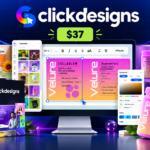
That is the problem ClickDesigns X says it solves. It is positioned as an all-in-one design tool for online sellers, with templates, a point-and-click editor and a 3D product studio that turns flat artwork into mockups.
This ClickDesigns Review is for marketers, authors, course creators, supplement sellers, store owners, freelancers and affiliates who want to know whether the new version is worth their money.
ClickDesigns X is scheduled to open on Tuesday, October 13, 2026, in a JVZoo software launch with a front-end price of $37 and a longer funnel behind it. Launches are noisy. Many promoters are paid to say yes. So I wrote this review to say what the materials show, and also what they leave out.
In this review I cover what the product is, how it is meant to work, every major feature, the pricing funnel and the claims I would verify before paying. I also cover who should buy it and who should wait.
Disclosure: This ClickDesigns Review may contain affiliate links. If you buy through one of my links, I may earn a commission at no extra cost to you. That does not change the price you pay or what I write.
The United States Federal Trade Commission explains why this kind of disclosure matters in its Disclosures 101 for Social Media Influencers guidance. It says people should be told about a financial connection with a brand. It also says an endorser cannot describe experience with a product they have not tried.
Important note: This review is based on the supplied ClickDesigns X launch materials. These include the joint venture (JV) document, the sales page preview and the launch page. I have not physically tested the software. Where I describe a feature, I am describing what the vendor claims.
Features, pricing, limits, bonuses and availability can change during and after launch.
ClickDesigns Review: Quick Verdict
Here is the short version for readers in a hurry.
ClickDesigns X is presented as a Canva-style editor combined with a 3D mockup engine. You pick a template or start from scratch, customize it, and use a feature called MagicWrap to place your flat design onto 3D products such as books, boxes, laptops, phones and supplement bottles.
The idea fits a real need. Online sellers do need covers, box shots, bundle images and social graphics. Most of them do not want to learn Photoshop, fight with AI image prompts or pay a freelancer for each new angle.
The strengths are a clear use case, a low $37 launch price, a commercial license and a 30-day money-back guarantee. The product also has a track record. Version 1.0 launched in 2022.
The weaknesses are mostly about proof. Several big numbers cannot be checked, such as $1 billion in user sales and 4.8 stars from 6,898 reviews. User counts and bonus values differ between pages. The front-end limits are never spelled out.
My position is cautiously positive. I think ClickDesigns X is worth a look for sellers who really need mockups. But I would not buy it on launch-day excitement alone. Test it hard during the refund window.
ClickDesigns Review: ClickDesigns X Product Snapshot
ClickDesigns X Review 2026
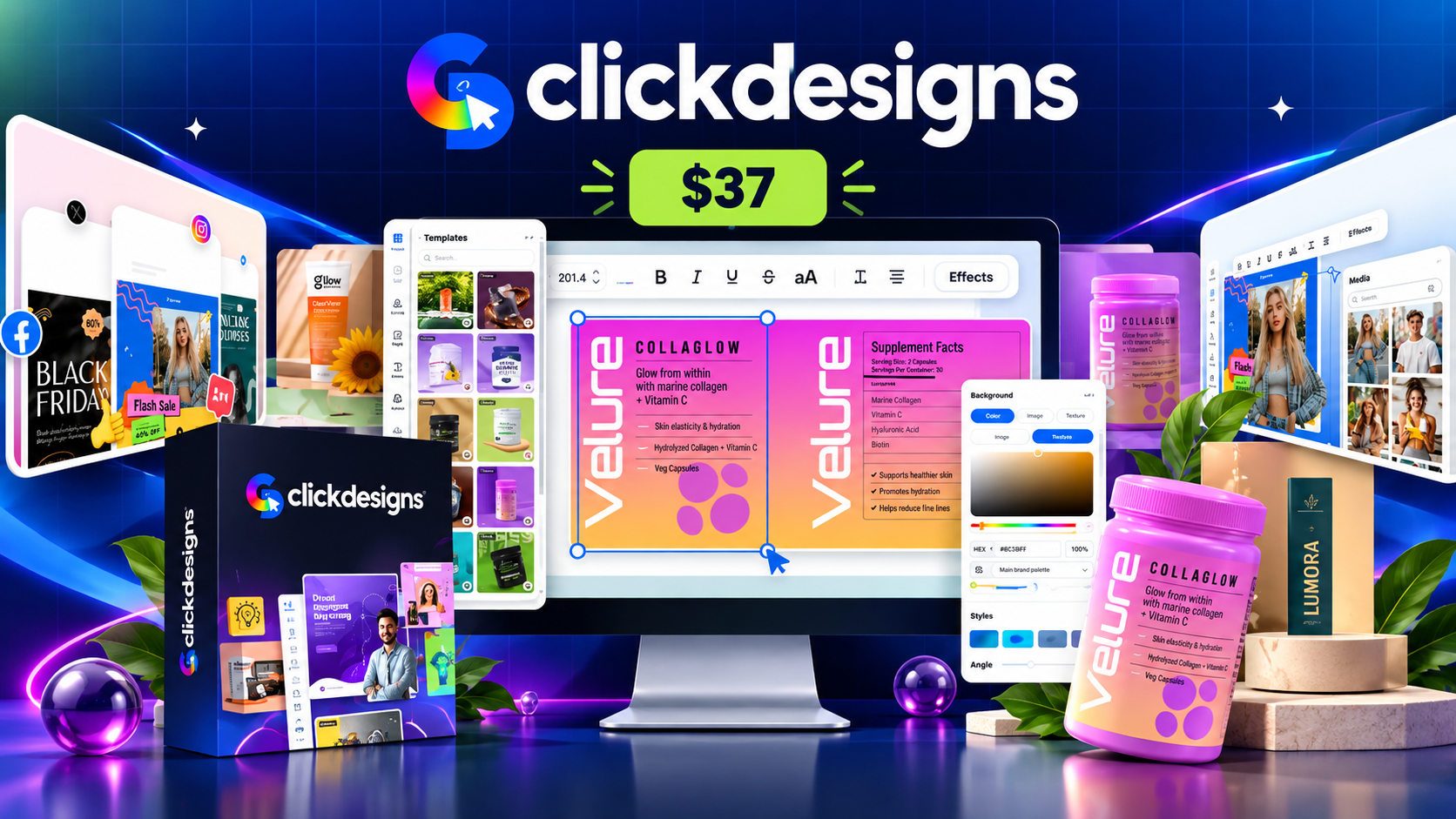
ClickDesigns X is promoted as a visual design platform for creating digital product graphics, eBook covers, product mockups, and marketing assets. This review examines its advertised features, pricing, and potential use cases based on the available product information.
Affiliate Disclosure: This article contains affiliate links. If you purchase through these links, we may earn a commission at no additional cost to you. Prices, features, license terms, and money-back guarantee conditions should be confirmed on the official checkout page before purchasing.
ClickDesigns Review: Who Created ClickDesigns?

Meet the Team Behind ClickDesigns
ClickDesigns Creator & Vendor
ClickDesigns is led by Mo Latif, who launched the original version of the platform in 2022. The ClickDesigns X launch is presented as an updated design solution for marketers, digital product sellers, authors, course creators, and agencies who need graphics, covers, logos, and 3D product mockups.
ClickDesigns Review: Teaser, FE Sales & Demo Videos
ClickDesigns X Teaser Video
Product PreviewGet a first look at ClickDesigns X and its visual design concept. This teaser is a useful starting point for understanding the product’s intended audience and its focus on graphics, product covers, and 3D mockups.
ClickDesigns X FE Sales Video
Offer OverviewWatch the front-end sales presentation to learn how ClickDesigns X is marketed, which benefits the vendor highlights, and what the core offer is intended to provide. Review the checkout details carefully before purchasing.
ClickDesigns X Product Demo
Workflow DemonstrationExplore the product demonstration to see the workflow presented by the vendor. Pay attention to the editor, template customization, 3D product mockups, and export process, where shown, to judge whether the advertised workflow suits your needs.
ClickDesigns Review: What Is ClickDesigns X?
ClickDesigns X is described as an all-in-one visual engine for people who sell things online. You choose a done-for-you template or start from a blank canvas. You customize it with drag-and-drop controls, and then export the result.
The output list is long. It covers logos, box shots, covers, reports, digital mockups, product bundles, and graphics for pages, videos, socials, emails and ads.
The big new feature is the 3D Product Studio with 1-click MagicWrap. It is meant to take a flat design and wrap it onto a realistic 3D product. Then you can view that product from different angles and layouts.
The sales page puts the promise this way: no design skills, no freelancer, no code and no endless AI prompting. It also says you will not need to start over each time you want a new angle.
In plain words, ClickDesigns X is a graphic design software for marketers that adds a mockup layer. It is not trying to replace a full professional design suite. It is trying to give non-designers a faster route to the visuals that online sellers actually use.
This is a useful lens for the rest of the review. The product should be judged against a seller’s real jobs: a cover for a course, a bottle for a supplement, a bundle shot for a sales page. It should not be judged against what a professional illustrator could do in Photoshop.
ClickDesigns Review: Why 3D Product Mockup Software Is Trending
To decide whether ClickDesigns X is timely, look at the problem behind it. Selling online means selling things people cannot hold. A buyer cannot turn a digital course over in their hands. They only see the picture.
That is why 3D product mockup software has become a popular category. A flat cover looks like a file. A 3D book, box, laptop or bottle looks like a product. Many digital sellers use this trick to make downloads, courses and software feel more real.
Visual content is also a daily struggle for marketers. HubSpot’s article on visual content marketing statistics collects survey data on the topic. It reports, through Venngage research, that marketers rate original graphics as the best-performing visual type and stock photos as the worst.
The same article says roughly a third of marketers find producing visual content consistently to be their biggest struggle. That matches the pain ClickDesigns X is aimed at.
Of course, a trend in the market does not prove that one product is good. Many tools chase the same demand. But it does explain why a product like this can sell well at launch. The need is common, and the promise is easy to understand.
If you want a wider view on judging software like this, this AI tools review from Digital Trends Wave explains how to weigh automation and productivity claims. It is a helpful companion when every product on the market promises to save you time.
ClickDesigns Review: The Problem ClickDesigns X Tries to Solve
The sales page spends a lot of time on what it calls the “design tax.” This is the time, money and frustration that come from creating professional visuals the hard way. It describes three routes that most sellers have tried.
Route 1: Design software. You open a design or 3D tool, start from scratch, source assets, build the layout, add lighting and shadows, revise and export. Then you repeat the process for every new angle. This is powerful but slow, and it has a learning curve.
Route 2: AI image generators. You write a prompt and generate an image. The product changes shape, the logo disappears, the text comes out wrong, and you regenerate. Anyone who has tried to get an AI tool to keep a product consistent knows this feeling.
Route 3: Freelancers. You find someone, brief them, wait, review, request revisions and pay per job. Each new angle or campaign becomes another invoice.
The sales page claims a single campaign can cost about $2,000 in designer fees. It also claims tool and AI subscriptions can run around $200 a month, and that doing it yourself costs more than $500 of your time per campaign.
These are the vendor’s own estimates. Real costs vary widely. A freelancer on a small budget can charge far less, and a free tool can cover simple needs. But the underlying point is fair. Visual production takes time or money, and it repeats with every campaign.
ClickDesigns X offers a fourth route: a template-driven editor plus automatic 3D wrapping. Whether it works well enough to replace the other three depends on its quality, which I cannot judge without hands-on use.
ClickDesigns Review: How ClickDesigns X Works – The Three-Step Process
The sales page describes a simple three-step process. Here is each step, with my comments.
Step 1: Customize
You start with a template, an uploaded image or a PDF, or a blank canvas. Then you edit it using point-and-click controls. You can change colors, backgrounds, fonts, effects, shadows and positioning.
This part sounds like other drag-and-drop design tools. The promise is “Canva simplicity combined with the firepower of Photoshop,” which is a marketing line. I would judge it by how easy the editor feels in the first hour and how much control it gives you over text, layers and exports.
Step 2: Automate
Next, you use MagicWrap. The sales page says your flat design is automatically mapped, fitted and wrapped onto a 3D product model. It adapts to the product’s shape, depth and perspective.
If this works as shown in the demos, it removes the hardest part of mockup making. You do not need to warp artwork by hand or match perspective manually.
The quality of the wrap matters a great deal. Look at edges, spine text on books, label curves on bottles and screen content on laptops. Small errors there make a mockup look fake.
Step 3: Profit
The third step is to generate variations and use them. The page says one design can become many angles, stacks, boxes, laptops, phones and tablets in a single click. You then place these on sales pages, ads, emails and social posts.
“Profit” is a promise, not a step. The software can give you better visuals. It cannot guarantee that better visuals will turn into sales. I come back to this in the income section below.
Overall, the workflow is logical: design once, wrap once, reuse many times. If it works smoothly, that can save real time for anyone who produces product visuals often.
ClickDesigns Review: ClickDesigns X Features – What the Sales Page Promises
The feature list is long. I group the claims by theme below and add what I would verify for each one.
1. The ClickDesigns X Engine (Point-and-Click Editor)
The core of the product is the editor. The materials describe drag, drop, resize, layer, align, crop and style controls. They also mention pixel-level control over colors, backgrounds, typography, effects and shadows.
A good editor is the base of everything else. If basic editing feels clumsy, the 3D tools will not save you. I would look at how fast you can change text, swap an image, nudge a layer and export a clean file.
The sales page compares the editor to Canva for simplicity and Photoshop for power. That is a big claim. A realistic outcome is a capable template-based editor with a mockup layer on top. If it does that well, it is already useful.
2. 3D Product Studio
The 3D Product Studio is described as a 360-degree studio. You can spin, tilt and zoom a product to find the angle you like. The page also says you can apply colors, lighting, blur, shadows and material effects with one click.
This is the feature that sets the product apart from a plain editor. Being able to preview a book or bottle from several angles before exporting is helpful. It lets you choose a hero angle for a sales page and a different one for an ad.
Questions to ask: how realistic is the lighting, how many angles are available per product, and what resolution can you export? Test those before relying on it for client work.
3. 1-Click MagicWrap
MagicWrap is the headline technology. The idea is that your flat artwork is automatically wrapped onto a 3D model, and the result updates when you change the artwork.
The sales page says one flat design can become stacks, new angles, box covers and device shots almost instantly. An example in the preview shows a single book design turning into a book bundle with laptop, tablet and phone.
The advantage is consistency. Unlike an AI image generator, which creates a new picture each time, a wrap tool should apply the same artwork the same way. That is a real difference for anyone who wants exact text and logos on a product.
4. 2D and 3D Product Mockup Types
The materials list a wide range of mockup types. They include paper and hardcover books, software boxes, report and magazine covers, laptops, monitors, tablets, phones, watches, CDs and DVDs. They also include supplement tubs, pill bottles, gummy bottles and dropper bottles.
The supplement and cosmetic coverage stands out. Many mockup tools focus on books and devices. Seeing bottles, tubs and droppers suggests the product also targets physical-product sellers, such as nutra and beauty brands.
I would check how many variations exist for each type, how well labels wrap around curved bottles, and whether you can add your own product photos.
5. Done-for-You Template Vault
The front end is said to include thousands of done-for-you templates. They cover bundles, covers, social posts, packaging, logos and more. The first upgrade adds “10,000+ more templates.”
Templates are the quickest route for non-designers. A good template library means you edit, not create. The risk is sameness. If many buyers use the same templates, many products can end up looking alike.
Customize your templates properly. Change colors, fonts, layout and imagery so your visuals look like your brand.
6. Media Assets and Free Editor Upgrades
The launch page lists a large set of included media. These are thousands of fonts and pairings, real-world textures, 3D elements and badges, shapes and frames, backgrounds, 3D icons and illustrations. It also mentions millions of royalty-free stock photos.
Assets save time, but license terms matter. “Royalty-free” does not always mean “free to use anywhere.” Read the license for any asset you plan to use on a product you sell, and keep a copy.
7. Logos
The sales page promotes “1000s” of customizable logos and says a single professional logo can cost $300 to $1,000. It also mentions a nutra brand logo template.
Template logos are fine for quick branding. But for a serious brand, a template logo may not be unique or trademark-ready. If a logo is central to your business, have it checked before you rely on it.
8. Labels and Packaging
One part of the JV document describes “FDA-compliant” pre-sized label templates with bleeds, margins, die-lines and 300 DPI output. A later upgrade mentions “FDA supplier labels.”
I would be careful with this wording. A template can have the right size and layout, but legal compliance depends on what you write on the label and what you sell. Supplement and cosmetic labels have rules about claims, ingredients and warnings. Do not treat a template as a compliance guarantee.
9. Layer Management, Multi-Canvas and Exports
The launch page lists layer management, which lets you move elements forward or backward or lock them. It also lists a dynamic multi-canvas, so you can build a whole campaign of assets inside one project.
For exports, the page says you can export up to 300 DPI in JPG, PNG, WebP or PDF, and import your own designs. These are practical features. Multi-canvas is useful when you need a cover, a social post and an ad in matching styles.
10. Website Builder Integrations
The materials mention direct connections with GoHighLevel, Convertri, ProductDyno and Groove.cm. They also list a long set of tools the product works with, including WordPress, WooCommerce, Shopify, Kajabi and many email and funnel platforms.
“Works with” in a logo strip often means you can export an image and upload it anywhere. A true integration is different, because it connects accounts. I would ask which platforms have real account connections and which just accept your exported files.
11. Commercial License
The product includes a commercial license. The sales page says you can use designs for clients and sell them. It frames this as a way to start a design service.
Read the full license text. Look at what you can resell, whether templates can be sold as templates, and whether any assets have extra restrictions. The FAQ on the sales page lists a question about who owns the designs, but the answer is not shown in the material I reviewed.
12. Training and Support
The page promises beginner-to-expert video training and a support team. Support contact is support@clickdesigns.com. I could not see support hours or response times.
Good training matters for a tool with this many features. Check whether the training covers MagicWrap and the 3D Studio specifically, since those are the hardest parts to learn.
13. Launch Bonuses
The sales page lists two launch bonuses. One is a Custom Product Bundle Creator, described as a custom mockup designer. The other is a set of custom logos.
The bonus values differ across pages. I cover that in the claims section, because it is a good example of why you should not rely on “value stacks.”
ClickDesigns Review: Key Features Summary
-
Drag-and-Drop Design Editor: Create and customize graphics using a visual editing interface.
-
Ready-Made Templates: Start projects with templates for marketing graphics, logos, covers, banners, and other design needs.
-
3D Product Mockups: Create visual mockups for digital products, packaging, books, and product bundles.
-
2D and 3D Design Options: Prepare flat graphics and three-dimensional product visuals for promotional materials.
-
AI-Assisted Design Tools: Access advertised tools for tasks such as background removal, image enhancement, and image creation, depending on the available plan.
-
Product Bundle Graphics: Design coordinated product stacks and bundle mockups for sales pages and promotions.
-
Social Media Graphics: Prepare visual content for social platforms, advertising campaigns, and online promotions.
-
High-Resolution Exports: Export supported file formats, with output options advertised up to 300 DPI.
-
Multiple Design Applications: Create graphics for websites, sales funnels, digital products, e-commerce, and marketing materials.
-
Commercial Design Uses: Commercial-use options are advertised. Check the specific license and included rights for your selected offer.
ClickDesigns Review: Who Is ClickDesigns X For?
The sales page lists many audiences. I picked the ones where I think the product fits best, and I explain why.
Course Creators and Coaches
Digital courses suffer from the “invisible product” problem. A course is a set of videos, so the sales page needs a visual. A 3D box, a laptop showing a member area and a stack of workbooks can make a course feel more complete.
If you are creating products at speed, pair this kind of tool with a product-creation workflow. My ProductsPilot Review looks at a very different tool for creating and publishing digital products. The two solve different parts of the same job, which is making and presenting a product.
Authors and Publishers
Book covers and 3D book stacks are the classic use. The sales page uses a book example throughout. If you publish on Amazon or sell ebooks from your own site, a better cover presentation is worth a lot.
Be careful with covers. A mockup tool does not design a good cover for you. If your cover artwork is weak, wrapping it in 3D will not fix it.
Supplement and Beauty Sellers
The bottle, tub and dropper mockups are aimed at physical brands. If you sell supplements or serums, you can test packaging ideas and show label designs before a print run.
Do your own regulatory check. Claims on supplement and beauty labels are regulated, and a mockup template does not decide what is legal to print.
Store Owners on Shopify, Etsy and Amazon
The page lists store designs, product listing visuals and group shots. Store owners need many images, and they need them in consistent styles. A multi-canvas editor and templates could help here.
Marketplaces have their own image rules, so check them before uploading mockups as main listing images.
Social Media Marketers
The product includes social templates in many sizes for Instagram, Facebook, Pinterest, LinkedIn and more. A social-focused upgrade adds scheduling and publishing.
If your work is mostly social posts, compare how the editor handles simple designs. Not every post needs a 3D mockup.
Software Creators and Video Creators
Software sellers can show their app on laptop, phone and tablet mockups, and box shots. Video creators can use bundle graphics in thumbnails and lower thirds. If you turn written content into video, my Blog2Vid Review covers a tool built for that. A good cover or thumbnail then helps the video get clicked.
Freelancers and Agency Owners
The sales page says the commercial license lets you create visuals for paying clients. This is the “sell it” route. Mockups and logos are a small, repeatable service that many business owners buy.
To make this work you still need clients. That means prospecting and outreach. If you plan to sell design services to local businesses, my AIProspectGenie Review looks at a tool built to find and research prospects. And if you are working out where buyers for your own offers hang out, my BuyerEngine AI Review explores a buyer-intent tool.
Affiliates and Bloggers
The page also pitches the tool to affiliates who want their own promotional graphics instead of the same vendor images as everyone else. That is a sound idea. Unique visuals can help a bonus page or review post stand out.
If you build review pages or bonus pages, the right visuals matter. My Affinova Review covers an AI affiliate website builder, which is a related piece of that puzzle.
ClickDesigns Review: A Practical Workflow Example
Let me turn the features into a realistic example. Suppose you sell a $47 course on email marketing.
Day 1: Prepare the artwork. Create one flat cover design in the editor. Keep the title large and simple. Use a template as a starting point and change the colors to match your brand.
Day 2: Use MagicWrap. Wrap the cover onto a 3D box and a book. Add a laptop mockup showing your member area. Export a clean version for each.
Day 3: Build a bundle shot. Combine the box, book and devices into one bundle image. This becomes the hero image for your sales page.
Day 4: Create supporting assets. Make a social post, an email header and an ad image in matching styles using multi-canvas.
Day 5: Test. Replace the old sales-page image with the new one. Keep a record of results.
That is a believable use of the product. Notice what it does and does not do. It speeds up image production. It does not write your copy, fix your offer or bring traffic.
ClickDesigns Review: How to Judge Graphic Design Software for Marketers
Because there are so many tools, it helps to have a checklist. When I look at graphic design software for marketers, I ask these questions.
Is the output good enough to publish? Export a real design and put it next to your current one. Look at it at full size and on a phone.
How fast is the workflow? Time yourself making a cover, a bundle and a social post. Speed is the main reason to buy a tool like this.
How much control do you have? A tool that only works with templates may frustrate you when you want a custom layout.
What are the limits? Check limits on projects, designs, downloads, storage and export size. The front-end limits are not clear in the launch materials, and the first upgrade promises “unlimited” projects, designs and downloads. That suggests the base version may have caps.
What are the license rules? Know what you can use commercially.
What happens after launch? The page says the offer moves to a monthly subscription. Find out how that affects early buyers.
For a wider process you can use on any online product, this digital products review guide from Grow Digital Hub explains how to compare features, pricing and support. I recommend reading it alongside the checklist above, because it helps you decide with a clear head instead of a countdown timer.
Google’s own advice for content creators is also useful here. Its guidance on creating helpful, reliable, people-first content stresses original, valuable pages over thin ones. Fancy visuals can support a page, but they do not replace useful content. If you use ClickDesigns X for a blog or sales page, put the effort into the substance too.
ClickDesigns Review: ClickDesigns X Pricing & Funnel Breakdown
ClickDesigns X is promoted as a visual design platform for creating marketing graphics, product mockups and digital assets. The launch funnel includes a front-end offer and five optional upgrades. Compare the advertised features and prices before choosing an option.
ClickDesigns X
The core platform is aimed at marketers, creators and online business owners who want to produce graphics and product visuals using a visual editor.
- Point-and-click visual design editor.
- Templates for logos, covers, banners and marketing graphics.
- Product mockup and promotional design workflows.
- A starting option for buyers interested in the core platform.
Maximizer
An optional upgrade for users who want expanded design resources and additional tools for regular graphic production.
- Advertised access to 10,000+ additional templates.
- Premium editor and custom template designer.
- One-click design cloning tools.
- Unlimited projects, designs and downloads as advertised.
ClickSocials X
An optional addition for users creating and publishing social media content for a business or brand.
- Social media content creation tools.
- Post scheduling and publishing features as advertised.
- Tools to support a recurring social content workflow.
- Designed for people managing regular promotional posts.
3D Design Studio X
Intended for users who want more advanced three-dimensional product presentations for sales pages and promotional campaigns.
- Advertised animated and interactive 3D mockups.
- AI-assisted 3D design capabilities as promoted.
- Tools for creating custom product bundles.
- Useful to consider if product visualization is central to your workflow.
Agency
An upgrade aimed at agencies, service providers and teams handling design work for clients.
- Multi-team access as advertised.
- Custom branding and white-label capabilities.
- Client management features.
- ClickDrive and agency-oriented workflow tools as promoted.
AI Turbo
An optional upgrade for users who want AI-assisted creative production for advertisements and social media campaigns.
- AI-generated advertising creatives as advertised.
- Social campaign design workflows.
- Creative variations in multiple sizes as promoted.
- Potentially useful for producing campaign assets at scale.
ClickDesigns X Bundle
The bundle is promoted as a combined option for buyers who expect to use the core platform and several additional upgrades.
- Advertised access to the core offer and five upgrades.
- Combines expanded design resources with social, 3D, agency and AI-focused tools.
- May be worth comparing against separate upgrades if you need several of them.
- Confirm all inclusions, licensing rights and the final checkout total before purchasing.
Choose Your ClickDesigns X Offer
Compare the core offer with the complete bundle, and verify the latest price, included features and license on the official checkout page.
Get ClickDesigns X for $37 View Complete Bundle for $39730-Day Money-Back Guarantee
Launch materials advertise a 30-day money-back guarantee. Before ordering, review the current refund policy and confirm whether it applies to the front-end offer, bundle and individual upgrades. Check the official checkout terms for conditions, exclusions and refund-request instructions.
ClickDesigns Review: Is ClickDesigns X Expensive?
At $37, the front end is cheap compared with design subscriptions or freelancers. Even if you only use it for a few covers and bundle shots, the cost is small.
But the full funnel is a different story. If you take every upgrade, you spend $572 or $397 for the bundle. That is a serious amount for a tool you have not tested.
There is another cost to consider. The sales page says the one-time price will switch to a monthly subscription after launch. It also says the “regular price” is $97 a month. If the product later costs $97 a month, today’s one-time price looks like a very good deal. But a “regular price” shown in a launch sales page does not prove anyone has paid it.
My view is simple. The front end is priced like an experiment, and the upgrades are priced like a business decision. Treat them differently.
ClickDesigns Review: Should You Buy the Bundle or Start With the Front End?
I would not tell every reader to buy the bundle. It depends on what you plan to do.
Start with the front end if: you want to see whether the editor and MagicWrap meet your standards. You are a solo seller who needs covers and mockups for your own products. You are not sure you need social scheduling, agency tools or AI ads.
Consider the bundle if: you already know you will use several upgrades. You run an agency or plan to sell design services. You are certain the unlimited limits matter to you. You have used ClickDesigns 1.0 and trust the product.
A middle path is to buy the front end, test everything in the first two weeks, and decide on upgrades before the 30-day guarantee ends. The risk is that a launch-week bundle price may disappear. That is a real tradeoff. But a price that vanishes is not a reason to buy something you have not tested.
Also check whether upgrades carry their own refund terms. Some funnels handle upsell refunds differently from the front end.
ClickDesigns Review: Which Upgrades Make Sense?
Maximizer ($97) makes sense if the front end limits you. Check what the base limits are first. If you run into a cap on projects or downloads quickly, this upgrade is probably the first one worth considering.
ClickSocials X ($77) makes sense if you post often. If you already use a scheduler, you may not need another one.
3D Design Studio X ($97) makes sense if you want shareable, interactive 3D views or product videos. The front end already has a 3D studio, so ask exactly what this adds. My reading is that the front end lets you create and export angles, while this upgrade adds animated mockups, videos and live embeds. Confirm that with the vendor.
Agency ($197) makes sense only if you serve clients and need team seats, branding and project management.
AI Turbo ($67) makes sense if you want automated ad and social creative. AI-generated ads need review before you publish them.
ClickDesigns Review: Claims to Verify Before You Buy
An honest review should say where the material is vague or inconsistent. None of these items proves the product is bad. Each one deserves a straight answer.
1. User Counts Do Not Match
The JV page headline says 34,898+ users. A line below says 34,848+ users. The sales page and the launch page say 34,114+. These are close, but they are not the same. They could be from different dates. It is a small sign that numbers are copied around without a single source.
2. The “$1 Billion in Sales” Claim
The materials say ClickDesigns users have generated more than $1 billion in sales. Divide that by about 34,000 users and you get roughly $29,000 per user. That would be an unusual average.
The claim may count all sales made by anyone who used a ClickDesigns graphic anywhere. But the pages do not explain how it is measured or who verified it. I treat it as marketing, not as evidence of what you will earn.
3. “4.8 Out of 5 From 6,898 Reviews”
The rating appears many times. The materials do not say where the reviews come from. That matters. A rating on an independent platform means more than a figure on the vendor’s own page. Ask where you can see the reviews.
4. The Sabri Suby “31%” Example
The sales page shows a book mockup called “Sell Like Crazy” next to the name of the author, Sabri Suby, with a quote that says conversions increased by 31%. It does not explain what was measured, who measured it, or whether the author endorsed ClickDesigns X.
A well-known book cover is a convenient demo. But it is not proof that a mockup lifted conversions by 31%. I would treat that number as unverified.
5. The “Visual Stats” on the Sales Page
The page cites claims like “visuals are processed 60,000 times faster than text” and “90% of what the brain takes in is visual.” These are widely repeated statistics, and they are often criticized for having weak sources. They are not evidence about this product.
6. Conversion Numbers Are Self-Reported
The JV material says version 1.0 converted at 10.65% with an EPC of $7.47, and that 61.2% of front-end buyers took the first upgrade. These numbers help affiliates decide whether to promote. They tell a buyer little about software quality, and they come from the vendor.
7. “54 Consecutive Months Since January 2022”
The JV page says there have been 54 consecutive months of paid sales since January 2022. By my count, January 2022 to October 2026 is closer to 57 or 58 months. They may count differently. But it is another small mismatch.
8. The “Not AI” Claim
The JV page says the product is “NOT AI or a wrapper.” But the sales page preview is titled “ClickDesigns AI,” the editor screenshot shows an “AI Background” option, and the funnel includes an AI Social Writer, a Smart AI Studio and AI Turbo.
It may be that the core MagicWrap engine is not generative AI, while add-ons are. That would be consistent. But it would help if the vendor said which parts use AI.
9. The Value Stack
The sales page lists a “total value” of $14,870. I checked the sum. The individual items add up to that figure when the logo bonus is counted at $497. But the JV page values the logos at $397. Item values like “$4,997” for a template vault are not prices anyone actually pays.
Value stacks are a sales technique. I ignore them when judging whether to buy.
10. Front-End Limits Are Not Stated
The first upgrade promises “unlimited projects, designs and downloads.” That strongly suggests the front end has limits. The materials do not say what they are. This is the most practical question a buyer should ask.
11. Installation and Platform Details
The page says the software is compatible with macOS, Windows and Chrome. The FAQ lists a question about installing anything on your computer, but the answer is not in the text I reviewed. Ask whether it is a desktop app, a browser app or both.
12. Trademark and Content Rights
Mockups often use device shapes and book covers. If you plan to show real brand products or someone else’s book cover, you could run into trademark or copyright problems. Use your own artwork and generic device shapes unless you have permission.
13. Heavy Urgency
The page uses a countdown and says the offer “is gone forever” when the price moves to a subscription. The JV page does say the launch ends on October 19 at 11:59 PM EST, so the deadline looks real. But a real deadline is still not a reason to skip testing.
14. A Crowded Promotion Period
The launch includes cash contests for affiliates. That is normal. It also means many promoters have a strong reason to publish positive reviews. Read all reviews with that in mind, including mine. That is why I share what I could not verify.
If you want to see how I handle contradictions in other launches, my CastleFlix AI Review goes through a launch where the sales material disagreed with itself on pricing and content rights. The same habit applies here: compare the pages with each other, and ask for answers in writing.
ClickDesigns Review: Can You Really Make Money With ClickDesigns X?
The sales page lists three “use it, promote it, sell it” routes. Here is my balanced view of each. I cannot promise any income, and neither can the vendor. The materials include a disclaimer that results are not typical and depend on your effort.
Route 1: Use It for Your Own Products
If you already sell something, better visuals may help you present it. The page says buyers “can’t pick up your product,” so good visuals matter. That is a sound point. A stronger hero image can improve how a page looks.
But there is no guarantee of more sales. Conversions depend on your offer, price, copy, traffic and trust. A mockup helps with only one of those factors.
Route 2: Create Your Own Promotional Assets
Affiliates and marketers can make their own banners and bonus images. That can set a page apart. The benefit is easy to see, but hard to measure. Test with a split test if you can.
Route 3: Sell Design Services
The commercial license lets you sell designs to clients. A logo, box shot and bundle image are small jobs that many small businesses need. If you are good at finding clients, this could pay for the software quickly.
But the market is crowded. Many designers and AI tools offer similar services at low prices. You would need a niche, a portfolio and a way to find customers. The software removes the production work. It does not remove the selling work.
A Balanced View of Income
The page’s own line, “Just 1 Graphic From ClickDesigns Will Cover Your Investment,” sounds nice. For a $37 price, a single paid logo job could do that. But I would not plan around it.
Think of the product as a time saver and a presentation upgrade. If it also earns money, that is a bonus.
ClickDesigns Review: The Real Costs Beyond the $37
A low front-end price does not mean a low total cost. Plan for these.
Upgrades. The funnel will show you several. Decide in advance which ones you need.
Your time. Learning a tool with many features takes hours. Training videos help, but they also take time.
Printing and fulfilment. If you create physical labels or packaging, printing and shipping are separate costs.
Stock and asset licensing. Check whether any assets you use have limits for commercial work.
Marketing. Good visuals do not bring traffic. You still need a plan to reach buyers.
Subscription later. After launch, the offer is said to become a monthly subscription. Ask what that means for your access and updates.
ClickDesigns Review: Refund Policy and Risk Protection
ClickDesigns X is advertised with a 30-day money-back guarantee. The page says you can create as many designs as you like during that time and ask for a full refund within 30 days if it is not for you.
This is a strong point if it is honored. It gives you time to test what I cannot test for you. I recommend using it like a real trial.
Here is a practical plan. On day one, log in and make a cover, a bundle and a social post. Export each in the largest size. Check them on your phone. On day two, test a supplement bottle or device mockup if you need those. Ask support a real question and note how quickly they reply.
By the end of week one, decide whether the output is good enough for your own sales pages. If not, ask for your refund before you buy any upgrades.
Read the vendor’s refund policy before buying. The FAQ lists the refund question, but I did not see the answer in the material. Also confirm whether upgrades have separate terms.
Note that the affiliate rules for the launch forbid promoters from encouraging refunds to game the system. I am not suggesting that. Use the guarantee honestly, for real evaluation.
ClickDesigns Review: What I Like About ClickDesigns X
1. It Targets a Real, Common Problem
Online sellers need visuals all the time. Covers, box shots, bundles, social posts and ads are daily needs. A tool built around those jobs is easier to understand than a general design suite.
2. MagicWrap Solves a Specific Pain Point
The hardest part of mockup design is wrapping artwork onto a 3D shape and matching perspective. If MagicWrap does that in one click, it removes a real barrier for non-designers. It also keeps your text and logo exact, which AI image tools often fail to do.
3. One Design Becomes Many Variations
The “create once, deploy everywhere” idea is sensible. Updating one design and getting many angles saves time. That matters most for people who produce visuals regularly.
4. The Low Entry Price
At $37, trying the front end is an affordable experiment. The cost is low next to freelancer fees or a stack of subscriptions.
5. A Commercial License Is Included
Many cheap tools restrict commercial use. Here the license is part of the offer, which suits freelancers and agencies. I would still read the full text.
6. The Product Has a History
ClickDesigns 1.0 launched in 2022, and the materials say it has been sold continuously since then. A product that survives for years is less likely to disappear after launch week.
7. Wide Format Coverage
The list of supported formats is broad. It covers web pages, store listings, social posts, ads, email, print and packaging. A single place to produce all of these is handy.
8. A 30-Day Guarantee
A month is a fair time to test a design tool. If you use it properly, you can judge it with real work.
ClickDesigns Review: What I Don’t Like About ClickDesigns X
An honest review has to include the weaker side as well.
1. Key Claims Are Unverifiable
The $1 billion figure, the 4.8 rating and the 31% conversion example have no visible source. When a page leans on big numbers, I want to see where they come from.
2. Front-End Limits Are Hidden
The materials do not say what is limited in the $37 version. That is the first thing a buyer should know, and it is missing.
3. Inconsistent Details
User counts, bonus values and the bundle coupon wording all vary. These are small issues, but together they suggest hurried preparation.
4. The Funnel Is Long
Five upgrades plus a bundle is a lot. Some are clearly optional, but the overlap between the front-end 3D studio and the 3D upgrade could confuse buyers.
5. The Switch to Subscription
The one-time price is described as a launch deal. After that, the model changes. That is fine for the vendor, but later buyers will pay more. Early buyers should ask what they are guaranteed, including updates.
6. Template Sameness
Template-based design leads to similar-looking results. If many sellers use the same templates, your visuals may not stand out as much as the sales page suggests.
7. Visuals Do Not Fix a Weak Offer
The sales page implies that better visuals will drive more sales. Better visuals help, but they do not fix poor copy, a weak product or no traffic.
8. I Could Not Test It
I have not used the software. Quality, speed and ease of use are the most important things, and I can only judge them from demos. That limit applies to any review based on launch materials.
ClickDesigns Review: Pros and Cons Summary
ClickDesigns X is promoted as a design solution for marketers, creators and online businesses. Here are the main advantages and limitations to consider before purchasing.
Pros
- Beginner-Friendly Approach: The point-and-click editor and ready-made templates may help users create graphics without advanced design skills.
- Multiple Design Applications: Supports advertised workflows for marketing graphics, logos, covers and product mockups.
- 3D Mockup Capabilities: Offers tools for presenting digital products and product bundles visually.
- AI-Assisted Tools: Advertised creative features may help with image editing and other repetitive design tasks.
- Commercial-Use Options: The offer advertises commercial licensing, which may benefit freelancers and online businesses, subject to the actual license terms.
- Optional Upgrades: Buyers can compare the core offer with additional tools for social content, 3D design and agency workflows.
Cons
- Upgrade Costs Can Add Up: Purchasing the front-end offer and every listed upgrade separately totals $572 at the advertised prices.
- Feature Availability May Vary: Some advanced tools are associated with optional upgrades, so buyers should verify exactly what the $37 offer includes.
- Learning May Still Be Required: Templates can speed up design work, but producing consistent, polished visuals still requires editing and practice.
- AI Output Needs Review: Generated images and edited graphics may need manual corrections before commercial use.
- Launch Terms Need Confirmation: The advertised $100 coupon and final bundle price should be checked on the checkout page.
- Independent Testing Is Limited: This summary is based on available product and launch information, not hands-on testing of every feature.
My Take: ClickDesigns X looks most useful as a presentation and production tool for sellers who need many product visuals. It should be judged on output quality and speed, not on its sales-page numbers.
ClickDesigns Review: Comparisons With Alternatives
ClickDesigns X is one option for creating marketing graphics and product mockups. These alternatives serve overlapping needs, but each has a different focus. Compare the tools based on your design workflow, preferred mockup style, budget and licensing requirements.
| Software | Best For | Main Strengths | Potential Limitations | Pricing Model |
|---|---|---|---|---|
|
ClickDesigns X Reference Product |
Marketers and digital product creators who want graphics and product mockups in one workflow. | Advertised template-based editing, product mockups and additional design-related upgrades. | Confirm which features are included in the base offer and which require upgrades. The launch offer and licensing terms should be checked before buying. | Advertised launch offer from $37, with a separate bundle and optional upgrades. |
|
Canva Official Website |
Everyday graphics, social media content, presentations and general marketing design. | Broad design toolkit, templates, collaboration features and mockup capabilities. | Some assets and advanced features require a paid plan. Its workflow may be broader than necessary if you only need specialized product mockups. | Free tier and paid subscription plans; check current regional pricing. |
|
Adobe Express Official Website |
Branded marketing graphics, social posts, promotional content and quick creative projects. | Template-based design, image editing, brand-oriented tools and integration with Adobe services. | Feature access can vary by plan. Users needing dedicated 3D product mockup workflows may need additional tools. | Free plan and paid plans; confirm current features and prices. |
|
Placeit Official Website |
Product mockups, apparel presentations, logo assets and promotional video templates. | Ready-made scenes and mockup templates for displaying designs on products and in lifestyle settings. | Customization depends on the template. Subscription or individual asset costs and licensing conditions should be reviewed. | Subscription and/or individual purchase options may be available; verify current terms. |
|
Artboard Studio Official Website |
Designers creating product presentations, branded mockups and visual scenes. | Mockup-focused design workflows, scene composition and visual presentation tools. | May take time to learn if you need more control over layouts and scenes. Available exports and features depend on the plan. | Free access or trial options and paid plans may be available; confirm current terms. |
|
Mockey AI Official Website |
Creators and print-on-demand sellers producing product listing mockups. | Mockup generation for supported product categories, with a workflow focused on presenting designs on products. | Template selection, download limits and output quality may vary. It is not necessarily a full replacement for a general-purpose design editor. | Free access and paid options may be available; verify current limits and pricing. |
Choose Canva if you need an all-purpose design workspace for everyday marketing content.
Choose Adobe Express if branded content and quick promotional graphics are your priority.
Consider Placeit if ready-made product scenes, apparel mockups and promotional templates are central to your work.
Consider Artboard Studio if you want more control over composing branded mockup scenes.
Consider Mockey AI if your main task is producing product mockups for an online store.
Consider ClickDesigns X if its combination of design tools and advertised mockup features fits your workflow. Check the exact offer inclusions before purchasing.
Comparison note: This is a feature-based overview, not a hands-on performance ranking. Pricing, free-plan limits, features and commercial-use rights can change. Visit each official website to confirm current details. The alternatives listed here were selected separately from the products identified in your previously supplied review list.
ClickDesigns Review: Who Should Buy ClickDesigns X?
I think the product suits these readers.
Digital product sellers. If you sell courses, ebooks, software or memberships, you need covers and bundle images. This is the clearest fit.
Authors and small publishers. Book mockups and stacks are a core use.
Supplement and beauty brand owners. If you are testing packaging concepts, the bottle and tub mockups may help. Check your label rules first.
Freelancers and small agencies. If you want to add mockups and logos as a service, the commercial license makes sense.
Marketers and affiliates. If you make many pages, ads and bonus graphics, you may save time.
Beginners on a budget. At $37 with a refund window, the risk is low as long as you skip the upgrades until you have tested the base product.
ClickDesigns Review: Who Should Probably Skip ClickDesigns X?
I would be cautious in these cases.
You already have a tool that works. If your current design software or mockup tool does everything you need, a new one may add little.
You rarely need visuals. If you create a graphic a few times a year, a subscription or one-off freelancer may be cheaper.
You need advanced design control. If you do professional brand work or complex illustration, a template-based tool will feel limiting.
You expect sales to follow automatically. A mockup does not create demand.
You cannot afford any loss. The front end is cheap, but upgrades add up. If money is tight, set a hard limit and stick to the front end.
You need clear legal assurance. If you plan to print regulated labels or use someone else’s brand imagery, get professional advice first.
If you want a framework for separating real value from launch hype, this in-depth AI tools review and digital products review for marketers offers a useful way to think about it. It fits well with the checks in this review.
ClickDesigns Review: A Practical Pre-Purchase Checklist
Use this list before you click buy. It should take less than an hour.
- Watch the demo and sales video. Note anything you are told about that the demo does not actually show.
- Ask support what the front-end limits are. Ask about projects, designs, downloads, storage and export size.
- Ask how the software runs. Is it a desktop app, a browser app, or both?
- Read the commercial license. Check what you can sell, and whether templates can be resold as templates.
- Confirm the bundle price. Find out whether $397 is the final price or the price before a coupon.
- Check the refund terms. Confirm whether upgrades are covered too.
- Ask what happens after launch. Find out how the switch to a subscription affects buyers, updates and support.
- Decide your first three projects. For example: a cover, a bundle image and a social post.
- Skip upgrades on day one. Test the front end first.
- Save everything. Keep screenshots of the offer and any support replies in case you need them.
ClickDesigns Review: How to Test ClickDesigns X During the Refund Window
If you buy, do not judge the tool by the sales video alone. Run real tests.
Test 1: Output Quality
Export a mockup at full size. Look at edges, text, shadows and lighting. Would you put it on your sales page?
Test 2: Speed
Time how long it takes to produce a cover, a bundle and a social post. Compare that with your current method.
Test 3: Wrap Accuracy
Check that text on spines, labels and screens stays sharp and aligned after wrapping.
Test 4: Your Own Artwork
Upload your own images and logos. Make sure the editor handles them without quality loss.
Test 5: Templates
Customize three templates until they look like your brand. See whether the results look generic.
Test 6: Exports
Export in each format you need. Check resolution and file size.
Test 7: Support
Send a real question and see how fast and how clearly you get an answer.
If most tests pass, the product earns its price. If several fail, ask for your refund.
ClickDesigns Review: Legal and Compliance Basics for Sellers
I am not a lawyer, and this is not legal advice. But a few points are worth knowing.
Disclose affiliate links. The FTC’s Endorsement Guides: What People Are Asking explains how endorsements and material connections should be disclosed. This applies to anyone who promotes products, including affiliates who use visuals made with these tools.
Avoid unsupported income claims. If you create marketing graphics with income promises, make sure the claims are true and provable.
Check label rules. Supplement, food and cosmetic labels are regulated. Templates do not guarantee that your label is legal.
Respect trademarks and copyrights. Do not use another company’s logo, device design or book cover without permission.
Read the license. Understand what you can do with the designs and assets before you sell them.
ClickDesigns Review: ClickDesigns X and the Wider Toolkit
Design tools are one piece of a larger workflow. A good cover helps only if you have a product, a place to sell it and people to reach.
If you are building that workflow, you may find these other reviews on my site useful.
For finding and researching business prospects, see my AIProspectGenie Review.
For spotting buyer intent in online conversations, see my BuyerEngine AI Review.
For turning written content into video, see my Blog2Vid Review.
For creating and publishing digital products, see my ProductsPilot Review.
For building an affiliate website, see my Affinova Review.
For a launch review that goes deep on contradictions in sales material, see my CastleFlix AI Review.
These are different products for different jobs. Together they show how many tools a seller can end up with, which is another reason to buy only what you need.
ClickDesigns Review: Is ClickDesigns X Beginner Friendly?
The sales page says the tool is built for complete beginners. I think the concept is beginner friendly, because templates and one-click wrapping remove most of the technical steps.
But a beginner still has to make design decisions. Which template fits your product? Which angle suits a sales page? How big should the title be? A tool cannot make those choices for you.
My advice for a first-time user is simple. Start with one product and one template. Make one cover, one 3D version and one social post. Watch the training videos before you try anything complex. Only add features such as multi-canvas projects after the basics feel comfortable.
Also give yourself a realistic learning budget. A few hours in the first week is normal for any editor with this many features. If it takes far longer than that to get a decent result, that is useful information for your refund decision.
ClickDesigns Review: Is It Suitable for Experienced Designers?
Experienced designers are not the main audience. The marketing talks about non-designers and marketers, and a template-driven editor will not give a professional the same freedom as a full design suite.
That said, a designer might still find value in the mockup side. Producing a book stack, a box shot and a device bundle by hand can take time. If MagicWrap produces clean results, it could speed up client work, even if the final polish happens elsewhere.
If you are a professional, test the export quality first. Check whether you can import your own layered files, how precisely you can position text and whether the output holds up at print resolution.
ClickDesigns Review: Do Better Visuals Really Increase Conversions?
This is the claim at the heart of the sales page, so it deserves a careful answer.
There is good reason to believe visuals matter. Buyers who cannot touch a product rely on images to judge quality and trust. A sharp, consistent product presentation can make a page feel more professional. That is common sense, and many marketers see it in practice.
But the amount of improvement varies. It depends on the product, the audience, the price and the rest of the page. A great mockup on a weak offer will not rescue it. A plain image on a strong offer may still sell.
The sales page shows a before-and-after example of a plain page turning into a polished one. That is an illustration, not a controlled test. The only way to know what a mockup does for your business is to test it.
If you can, run a simple split test. Show half of your visitors the old image and half the new one for a couple of weeks. Compare results. Keep the version that performs better, and treat everything else as opinion.
ClickDesigns Review: How to Build a Consistent Visual Brand With It
One quiet benefit of a tool like this is consistency. When every cover, ad and social post follows the same style, your brand looks more trustworthy. Here is a simple approach.
Pick a small palette. Choose two or three main colors and one accent. Use them on every design.
Choose two fonts. One for headings and one for body text. The editor’s font pairings can help.
Create a master template. Build one design you like, then duplicate it for new products or campaigns. The one-click cloner mentioned in the first upgrade may help here.
Keep a simple style note. Write down your colors, fonts and layout rules, so anyone who helps you can follow them.
Reuse angles. Pick two or three favorite mockup angles and use them for every product. That makes your sales pages look unified.
Consistency does more for credibility than any single fancy graphic. It is also the best way to avoid the generic look that comes from using template designs untouched.
ClickDesigns Review: Mockups, Images and SEO
If you publish on a blog or website, images affect more than looks. They can influence how fast a page loads and how people engage with it.
Google’s advice for site owners focuses on helpful content for people. Its guidance on creating helpful, reliable, people-first content asks whether your page offers original value. A mockup helps explain a product visually, but it works best next to useful, honest text.
Some practical habits help when you use exported mockups on a website. Compress images so pages load quickly. Use descriptive file names and alt text that describes what is in the picture. Do not stuff alt text with keywords. And always make sure the image actually matches what you are selling.
Be careful with before-and-after style images too. If a mockup suggests something your product cannot deliver, buyers may feel misled. A realistic picture that matches the real product builds more trust than an exaggerated one.
ClickDesigns Review: Common Mistakes to Avoid
Mistake 1: Buying Every Upgrade Immediately
The funnel will encourage you to add features. Wait until you have used the front end and know where it falls short.
Mistake 2: Using Templates Untouched
If you leave a template unchanged, your design may look like many others. Change the colors, fonts and layout.
Mistake 3: Showing a Product That Does Not Match
A mockup should reflect what the buyer will actually receive. Do not show a physical box if you only sell a download, without making clear that it is a representation.
Mistake 4: Ignoring Legal Basics
Check licenses, trademarks and label rules before you publish or print.
Mistake 5: Expecting Visuals to Do All the Work
Copy, price, offer and traffic matter just as much.
Mistake 6: Skipping the Refund Test
A guarantee only helps if you use the time to test. Do not leave the tool unopened for 30 days.
Mistake 7: Making Income Promises
If you sell design services or promote the tool, avoid promising results. State only what you can prove.
ClickDesigns Review: ClickDesigns X vs Doing Everything Manually
I am deliberately not framing this as a competitor comparison. The more useful question is how much repeated work the software could remove from your own process.
Done manually, a single product bundle might involve opening a design tool, finding a mockup file, placing the artwork, adjusting perspective, adding shadows, exporting, and repeating the process for each new angle. If you do that once a year, it is fine. If you do it every week, the time adds up.
ClickDesigns X tries to compress those steps into a template, a wrap and a few exports. If it works as shown, the savings come from repetition. The more visuals you make, the more value you may get.
If you only need a handful of images, the time you save may be small. That is why I keep coming back to the same advice: match the tool to how often you need it.
ClickDesigns Review: Final Verdict – Is ClickDesigns X Worth It?
After reading the launch materials closely, my answer is yes, with conditions.
The concept is sound. Online sellers do need good product visuals, and many do not want to learn complex software, fight with AI prompts or pay for every new angle. A template-based editor with automatic 3D wrapping addresses that directly.
The price is low enough that curiosity is affordable. A $37 front end with a 30-day guarantee limits the downside. The commercial license adds value for freelancers.
The conditions are about proof. Several big claims cannot be checked, the front-end limits are not stated and some details change from page to page. None of that proves the product is poor. It means you should test it rather than trust the page.
My advice is to buy the front end if you have a real use for mockups. Use the first week to test quality, speed and limits. Delay the upgrades until you know what you need. If the output does not meet your standard, use the refund.
If you would rather wait, that is also reasonable. Launches end, but the need for good visuals does not. There is no rule that says you must decide on day one.
Who I Would Recommend It To
I would consider ClickDesigns X if you are:
- A digital product seller who needs covers and bundles
- An author or small publisher
- A supplement or beauty seller testing packaging
- A freelancer adding mockups or logos as a service
- A marketer or affiliate who makes many graphics
Who I Would Not Recommend It To
I would probably skip it if you:
- Already have a tool that meets your needs
- Rarely need visuals
- Need professional-level design control
- Expect visuals alone to produce sales
- Cannot test it during the refund window
ClickDesigns Review 2026: Final Takeaway
ClickDesigns X is built on a simple idea: buyers cannot touch your product online, so show it well. With templates, a point-and-click editor and 3D mockups, it tries to give non-designers a fast way to do that.
This ClickDesigns Review comes down to a balanced conclusion. The product looks useful for sellers who need product visuals often. The launch has a clear deadline, with the cart scheduled to close on October 19, 2026, at 11:59 PM EST. But the sales material leans on numbers I could not verify and leaves key limits unstated.
So be curious, but not hasty. Ask your questions. Test the front end. Keep your receipts and emails. And remember that no design tool can replace a good offer, honest copy and a way to reach buyers.
Bottom line: ClickDesigns X is most compelling as a practical 3D product mockup software and graphic design software for marketers that can speed up visual production. Judge it by its output, not by the countdown. If you buy through my link, I may earn a commission at no extra cost to you, and I thank you for supporting independent reviews.
ClickDesigns Review: Get Instant Access + Premium Bonuses Worth $43,000 FREE!
ClickDesigns X + 17 Exclusive Premium Bonuses
Purchase ClickDesigns X through RidhTek Reviews and receive my complete package of 17 Exclusive Premium Bonuses at no additional cost. These bonuses are designed to complement your content creation, traffic generation, audience growth, monetization and online business workflow.
These bonuses are exclusively provided by RidhTek Reviews and are available to verified buyers who purchase ClickDesigns X through an eligible affiliate link.
AI Traffic Blueprint
A practical blueprint for using AI-assisted strategies to develop traffic sources and attract targeted visitors to your online properties.
Keyword Research Guide
A practical guide for finding relevant keywords, identifying search opportunities and planning content around targeted search terms.
Content Framework
A structured content framework for planning useful, engaging content that can support audience growth, search visibility and online promotion.
Organic Traffic Growth
Practical strategies for developing sustainable organic traffic through content, search optimization and consistent publishing.
Affiliate Monetization Guide
Strategies and practical guidance for incorporating affiliate marketing into an online business and developing additional monetization opportunities.
Authority Website Blueprint
A framework for building an authority-focused website with useful content, targeted topics and a structured approach to long-term online visibility.
AI Automation Workflows
Practical workflow ideas for using AI and automation to streamline repetitive online business, content creation and marketing tasks.
Lead Generation System
A practical system for developing lead-generation opportunities, attracting prospects and creating pathways for turning visitors into potential customers.
Brand Building Strategy
Strategic guidance for developing a recognizable online presence, building credibility and creating a consistent brand experience across digital channels.
Blog Monetization Guide
Practical ideas for turning valuable blog content into monetization opportunities through products, affiliate marketing, lead generation and other online models.
Product Launch Checklist
A practical checklist covering important preparation, content, promotional and operational steps for launching a digital product more systematically.
Content Repurposing System
A framework for turning existing content into multiple useful formats so you can extend its reach and get more value from every piece of content you create.
Conversion Optimization Tips
Practical conversion-focused ideas for improving landing pages, calls to action, offers and the overall visitor journey.
Copywriting Swipe Collection
Ready-to-adapt copywriting frameworks and promotional examples for headlines, offers, content and audience engagement.
Analytics & Performance Guide
Guidance for tracking useful performance signals, understanding audience behavior and making more informed content and marketing decisions.
Agency Growth Toolkit
A framework for packaging online services, working with clients and developing an agency-style business around digital marketing and online solutions.
Passive Income Blueprint
A long-term framework for developing online income opportunities through digital assets, automation, content and scalable business systems.
30-Day Money-Back Guarantee
ClickDesigns X launch materials advertise a 30-day money-back guarantee. Refund eligibility remains subject to the vendor’s current refund policy and applicable purchase terms. Review the official checkout terms before purchasing.
How To Claim Your 17 Bonuses
- Purchase ClickDesigns X using one of the purchase buttons below.
- Complete your purchase through the official checkout.
- Save your purchase receipt or transaction details.
- Contact RidhTek Reviews with your purchase information for verification.
- After successful verification, your 17-bonus package can be delivered to you.
Bonus Disclosure: These 17 bonuses are exclusively provided by RidhTek Reviews and are not represented as part of the official ClickDesigns X product. Bonus availability is subject to successful purchase verification through an eligible affiliate link. Contact RidhTek Reviews after purchase to claim the bonus package.
ClickDesigns Review: Frequently Asked Questions
1. What is ClickDesigns X?
ClickDesigns X is presented as a graphic design platform for creating marketing visuals, product mockups, digital product covers and other promotional assets. Its advertised tools include templates and a visual editor. The features available to you may depend on the specific offer or plan you purchase.
2. Is ClickDesigns X suitable for beginners?
Its template-based approach and visual editing tools may help beginners get started without advanced graphic design skills. However, learning the interface, choosing suitable layouts and producing polished designs can still require practice. Beginners should review the available demonstrations before purchasing.
3. What types of designs can I create with ClickDesigns X?
Advertised use cases include digital product covers, eBook graphics, promotional banners, marketing materials, product mockups and other online business visuals. The exact templates, design formats and export options available should be checked against the version and package you intend to buy.
4. Can ClickDesigns X create 3D product mockups?
3D product presentation and mockup creation are among the features advertised for ClickDesigns X. These tools may be useful for presenting digital products in sales pages and promotional graphics. Check the included templates, customization options and any package restrictions before relying on a specific mockup workflow.
5. Can I upload my own logos, images and artwork?
ClickDesigns has advertised support for incorporating users’ own visual assets into designs. Before starting a project, check the current editor’s upload formats, file-size limits and asset-handling options. Make sure you have the necessary rights to use any images, fonts, logos or other materials you upload.
6. Does ClickDesigns X require professional design experience?
Professional design experience is not necessarily required to use templates and basic editing tools. More complex layouts, consistent branding and print-ready artwork may still require design judgment. The platform can assist with production, but it does not automatically guarantee that every design will look professional or suit its intended audience.
7. What export formats and image quality are available?
Export formats and print settings can vary by ClickDesigns product version and plan. Check the current offer for the specific file formats, image dimensions, resolution and print-ready options included. If you need artwork for professional printing, confirm the required specifications before purchasing or preparing your final files.
8. How much does ClickDesigns X cost?
The launch details supplied for this review list a front-end offer at $37 and a bundle at $397. These are offer-specific prices and may change. Optional upgrades may be offered separately, so review the checkout carefully to confirm the final total, included features, recurring charges if any, and the terms of each purchase.
9. Does ClickDesigns X come with a money-back guarantee?
The launch information supplied for this review advertises a 30-day money-back guarantee. Before ordering, read the terms displayed on the actual checkout page, including the refund request process, deadline and any conditions that apply to your specific purchase. Keep your order confirmation for reference.
10. Can ClickDesigns X guarantee more sales or business growth?
No design tool can guarantee sales, conversions, traffic or business income. ClickDesigns X may help you produce visual assets, but results also depend on your offer, audience, messaging, distribution and overall marketing strategy. Evaluate it based on the design tasks you need to complete, rather than assuming a particular financial outcome.
Looking for more AI tools and digital product reviews? Check out our latest reviews or browse by Category.